


Recent Updates

We launched AI learning feature.

10 must read books for a beginner financial trader and investor!

10 must read books for a beginner financial trader and investor!

A Room without books is like a body without a soul – Cicero

Like any other skill, reading book(s) is a must if you want to learn in financial markets continuously.
Here are the Top 10 must-read books we recommend you should read as a beginner.

Next Read:10 key questions in your trading plan – why, what, how?
How to use strategy tester in Tradingview ?

How to use strategy tester in Tradingview ?

Did you know that Tradingview.com charts will allow you to build & test your own strategies on any chart?
Follow the below steps to learn how to use the ‘strategy tester’.

1 Visit TradingView.com or open your desktop client and make sure you are logged in.
2 Open your chart.
3 Click on the ‘
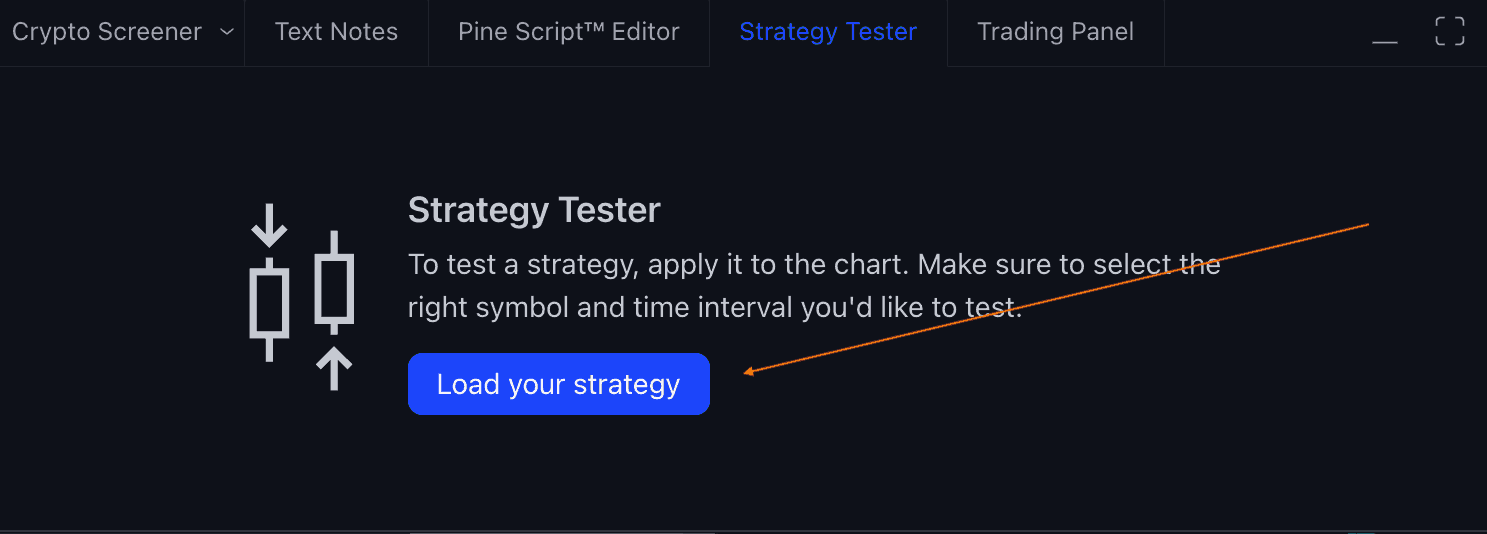
Strategy Tester tab which is in the bottom navigation pane of your chart window.
4 Click on the ‘
Load your Strategy‘ button which will open a pop-up window.
5 Click on the Strategies tab ( just below the Indicators tab ) and you will see a list of existing strategies.
6 Click on any of the strategies and you will see the ‘chart’ has now up and down coloured arrow(s)
7 Click the top arrow on the pop window to close.
8 You ‘Strategy Tester’ will have an Overview, Performance Summary and List of trades data which to help with your backtesting on your chart.

TradingView Tips - Strategy Tester

Image: Tradingview.com – Strategy Tester

Image: TradingView Tips - Load Startegy Tester Popup

Image: TradingView Tips – Load Strategy Tester Popup

#Pro tip: PineScript Editor Tab in the bottom nav tab will have the script which you can modify to create your own strategy and start testing on the Tradingivew.com historical data

Next Read: How to find the latest news headlines specific to the chart you are looking at on Tradingview?

[convertkit form=3305625]


How to find the latest news headlines specific to the chart you are looking at on Tradingview?

How to find the latest news headlines specific to the chart you are looking at on Tradingview?

Did you know that on Tradingview.com you can find the latest news headlines specific to the chart you are currently viewing?

Follow the below steps to learn how to do it.

1 Visit TradingView.com or open your desktop client and make sure you are logged in.
2 Open your chart
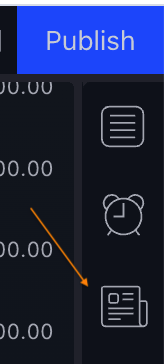
3 Click on the third icon from the top on the far right-hand side( below Publish button in blue) 

Tradingview.com News Headline for a chart

Image: Tradingview.com News Headline for a chart

4 You will a window slide open to the left which has all the news headlines.
5 Start from the top to read through all the latest news headline(s) specific to the chart you are currently viewing.
6 If you change the security symbol in the chart then your news headlines feed automatically changes.

#Pro tip: If you want to read detailed news of a headline then click on the headline to open a popup window. After you finish reading close the popup window by clicking ‘X’ on the far right-hand side to return to your chart view with news headlines.

Next Read: How to change your TradingView Chart background colour?

[convertkit form=3305625]

10 key questions in your trading plan – why, what, how ?

10 key questions in your trading plan – why, what, how ?

Trading & Investing in financial markets is a professional activity and your trading plan is a tool which can help you have clarity on what, why and how you are doing it. Here are the top 10 important questions and answers you need to know about the trading plan which can help you to make better decisions.

Risk comes from not knowing what you’re doing Warren Buffett

Q: What is a Trading & Investing plan?
A:
A trading plan is a document which has information about your goals, strategies and most importantly why you are trading & investing in financial markets. 

Q: Why do you need a Trading & Investing plan?
A:
Trading & Investing in financial markets involves you having to make regular decisions which mostly are to do with buying, selling, and holding financial securities. Having a trading plan will help you to be calm, and rational and avoid making bad emotional decisions which can be costly sometimes!

Q: How you should use the Trading Plan?
A:
As a best practice, you should look at your trading plan before you enter /exit a trade or investment.

Q: What are the key questions you should have answers for in Trading Plan?
A:
Here are the top 10 questions you should have answers to in your Trading Plan.
1 What are my Short ( 1-2 years ) & Medium ( 3-5 years ) term goals?
2 How much trading capital do I have?
3 What markets will I trade and invest in?
4 What is my risk-reward ratio?
5 Do I have sufficient Market knowledge or do I need to do some training?
6 What are my criteria for entering into trade/ investment?
7 How will I manage /monitor my positions in the market once they are open?
8 What are my risk management rules per trade? i.e Document your total capital// budget for trading, risk /reward ratio?
9 How many hours do I have to commit daily / weekly for trading/investing?
10 What type of trader am I?

Q: What are the potential consequences if you don’t have a personal Trading Plan?
A:
Bad decisions, Fear, Anxiety, Greed, Becoming Irrational, and Financial losses.

Q: How often to review & update your Trading Plan?
A:
You should attempt to review it every week and update it every month if necessary.

Q: Is there a basic trading plan template I can start using?
A:
We have put together a basic trading plan template which you can start using and customize according to your needs. You can 

Next Read: What is the difference between financial trading and investing?


[convertkit form=3305625]


How to change your Tradingview chart background colour ?

How to change your Tradingview chart background colour ?

Introduction:

We will explain how to customise the background color  of your tradingview chart personalized trading experience.

Steps

Step 1: Open TradingView and Load a Chart

  1. Navigate to the TradingView website or desktop app.
  2. Log in to your account.
  3. Load the chart of the asset you’re interested in.

Step 2: Locate the Settings Button or Right click and choose Settings option

  • Find the “Settings” button on the toolbar at the bottom of the chart.  Note: The icon looks like a gear  (or)
  • Right click and choose settings option

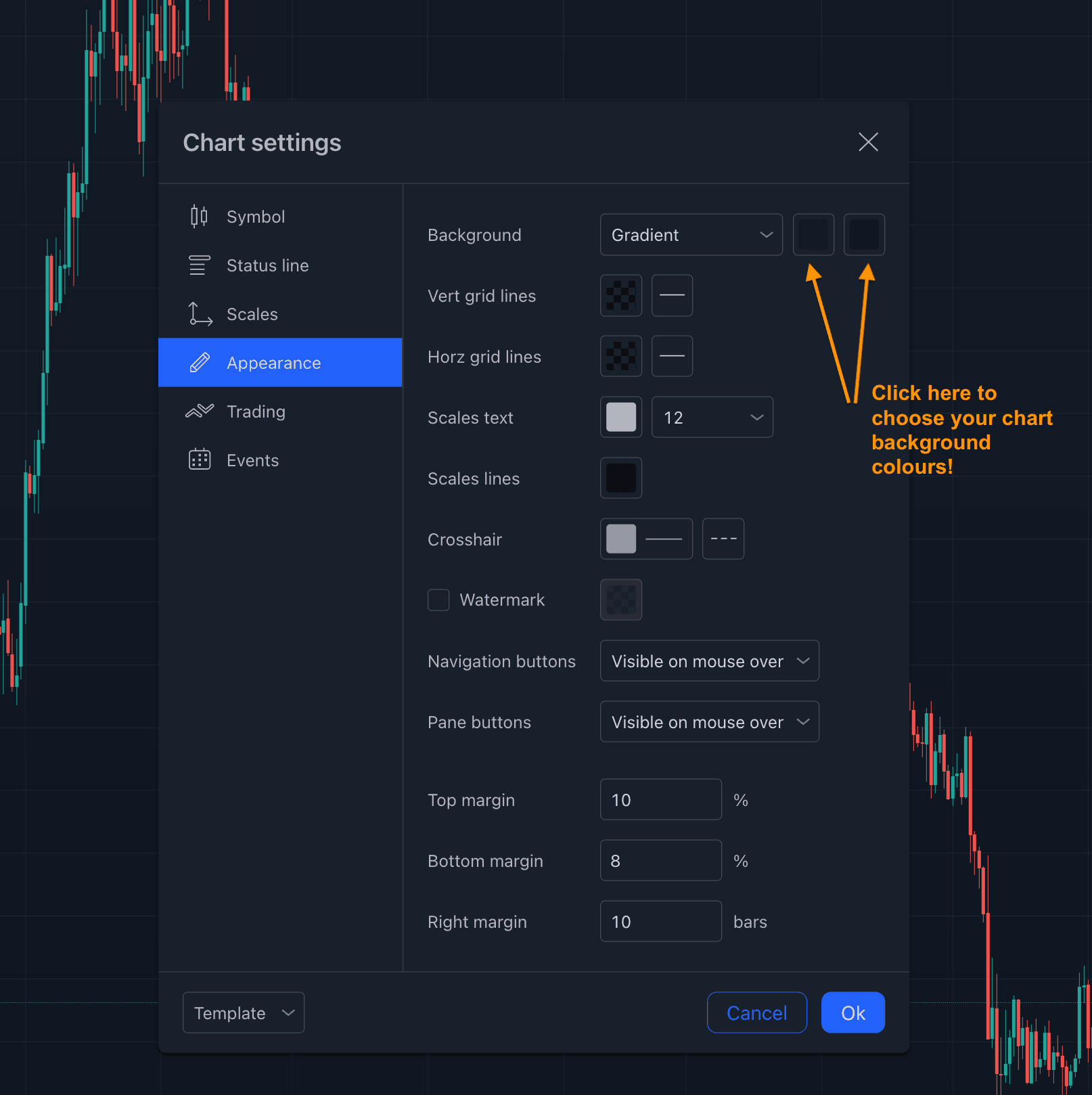
Step 3: Select Canvas & Choose Options

  • Select Canvas option on the left hand side 
  • First option is the ‘”Background” option.
  • Click on the color box next to “Background.”
  • Choose your desired color from the color picker, or enter a custom color code.
  • Click “OK” to set the new background color.
  •  Save and Apply

Once you’re satisfied with the new background color, click “OK” at the bottom of the “Chart Settings” dialog to apply the changes.

Step 4: Optional – Save as Default 

If you want to make this background color your new default for all charts, click on the “Template” button on the toolbar at the top of the chart.

Choose “Save As” and save it as your default template.

Next Read: How to hide /unhide all drawings, indicators, text, and position orders on your TradingView charts?

Difference between trading and investing in financial markets?

Difference between trading and investing in financial markets?

Financial Trading & Investing strategies are used by millions all around the world to grow their wealth. As a beginner, here are the most important answers you need to know to understand the difference between trading and investing in financial markets.

Q: What is Financial Investing?
A: Financial Investing is a medium to longer-term (months/ years!) approach to profiting from the price movement of financial assets.
Q: What is Financial Trading?
A: Trading is a shorter-term ( months, weeks, days, seconds! ) approach to profiting from the price movement of financial assets.

Q: What is the difference between Investing and Trading?
A:


Q: As a beginner, Is Investing or Trading – right for me?
A: There is no right or wrong answer as it all depends on personal circumstances. Somethings key things to think about as a beginner when making a trade or investment decision are as below:

  • Understanding of specific markets you want to trade or invest.
  • Financial Goals/ objectives
  • Risk tolerance
  • Time availability of you to dedicate towards research/ monitoring
  • Capital availability.

Always do your due diligence before making a financial decision(s) and most importantly make sure you re-evaluate your decision(s) on a regular basis.

Remember to Know what you own, and know why you own it Peter Lynch

Read Next: How to handle and avoid trading burnout?

[convertkit form=3305625]


Step-by-Step Guide: How to Temporarily Hide or Unhide Analysis Data on TradingView

Step-by-Step Guide: How to Temporarily Hide or Unhide Analysis Data on TradingView

Introduction:

TradingView.com charts can become cluttered with all your analysis data, making it hard to see a clear view. Luckily, TradingView offers options to temporarily hide or unhide some or all of your analysis data on a chart. In this post, we’ll show you how to do it and also provide a pro tip to make it even easier.

TradingView Tips - hide/unhide analysis data

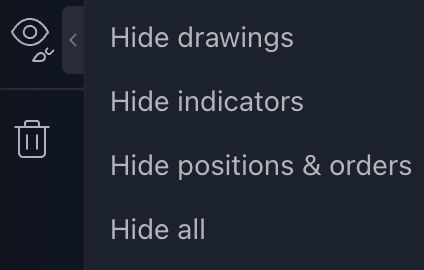
Image: TradingView.com chart Drawing Panel


Instructions to hide/ unhide analysis data on TradingView Charts:

Steps to Hide/Unhide Analysis Data on Your TradingView.com Chart

Step 1: Look for the Drawing Panel on the left-hand side of your chart.

Step 2: Click on the arrow beside the Eye-like Icon (second from the bottom, above the bin-like icon).

Step 3: You will see the following options:

  • Hide Drawings
  • Hide Indicators
  • Hide Positions
  • Hide All

Step 4: Click on one of the above options, and you will see the respective data removed or added back.

Pro Tip:

Press Ctrl+Alt+H (Windows) or Cmd+Opt+H (MacOS) on your keyboard to quickly hide or unhide your last selected option from Step 3. TradingView automatically detects your last selected option and performs the action when you press these keys on the keyboard.

Conclusion:

By following these simple steps, you can quickly hide or unhide all your analysis data on your TradingView chart for a clearer view. Whether you’re a beginner or an experienced trader, having a clean chart can make a big difference in your trading decisions.

[convertkit form=3305625]

Read Next:  How to find advanced technical summary of your Tradingview chart ?

How to handle and avoid trading burnout ?

How to handle and avoid trading burnout ?

Trading & Investing in financial markets is now easier than ever for retail traders with financial markets open 24 * 7. Don’t be surprised if you will feel burnt out at some point as Trading & Investing can be hazardous to your wealth and also health!

Here are the most important questions and answers you need to know about trading / investing burnout which can help you to handle burnout better and maybe avoid it!

Q: What is burnout?
A:
Burn-out is chronic stress and is characterised by a person’s feeling of complete physical & mental exhaustion, negativism/cynicism towards one’s job and reduced professional efficiency.
recently added occupational burn-out to the 11th revision of The International Classification of diseases to guide medical practitioners!

Q: What is the difference between Stress and burnout?
A:
Stress is a shorter-term symptom and it is mainly an inability to cope with pressure/overload. Burnout happens over a longer-term resulting in a negative mental state/disillusionment.

Q: What behaviours in your trading/ investing journey can cause burnout as you are participating in Financial Markets?
A:

  • Investing/trading real money without a plan/ strategy or with unrealistic expectations/goals – i.e without why, what and how.
  • Spending too much time in front of the monitor/screen (s) for no purpose or reason.
  • Not handling short-term stress-related symptoms.

Q: What are typical symptoms of burnout?
A:
Although burnout and stress symptoms differ from person to person, Below are some of the typical symptoms most traders and investors experience:

  • Negative feelings/cynicism/pessimism towards markets, family and friends and general day-day things.
  • Emotional detachment/disengagement from your once very close personal and professional relationships.
  • Mental and Physical fatigue and exhaustion.
  • Showing anger/irritation for no reason.
  • Anxiety while doing day-day things – for example looking at charts & reading news.
  • Feeling unmotivated to participate in financial markets and feel like taking a break.
  • Abnormal sleeping patterns – sleeping less or sleeping more than usual.
  • Accusing / Blaming others for your mistakes.

Q: What will be some of the consequences of burnout if you don’t handle it?
A:

  • You will make bad financial investment/trading decisions – basically the risk of losing money.
  • Negative impact on your personal and professional relationship(s).
  • Unproductive on a day-by-day basis and impact on your personal/professional life.
  • Impact & deterioration of your physical, emotional and spiritual health.
  • Impact on your Personal and Professional life.

Q: Handling Burnout: How to handle burnout as a trader/investor in financial markets?
A:
Evaluating and acknowledging you are in a burnout state is the most important first thing.
Then here is a three step ( 3T’s ) approach from FalconFunda which can help you can to handle burnout.

  • (T)ake a break & review: Take a break and ask yourself what part of my trading/ investing journey is causing me to burn out?. Make a list. Example: FOMO investing and incurring losses and anxiety, bad decisions, too much time in front of  a trading screen(s) etc,
  • (T)ake back control: Ask yourself what can I do differently? For example, if spending too much time in front of the trading screen is the reason for bad decisions and losses then take back control by setting boundaries and strict limits on daily screen time which will help you take back control and aid in your recovery and practice self-care by sleeping for the required number of hours and schedule time for activities you enjoy & cause you happiness: Relax, Hobbies, Friends, Family!
  • (T)ake professional help: If your remediation efforts are not helping, ask and regularly take professional help & advice if needed. This will help you to recover quickly!

Q: Avoid burnout: What can you do as part of your financial trading / investing journey to avoid burnout?
A:

  • Have a trading plan: Document a strategy/purpose before trading / investing in financial markets and continuously refine it – This will give you a perspective on why, what, when and how!
  • Maintain a personal trading journal: Document and regularly go through your investments and decisions.
  • Self-care: Regular screen breaks: Limit your time in front of your screen. Have a reminder to take a screen break. You can read more tips from Identify physical activities you enjoy doing which can aid your mental health and shorter-term stress relief. .
  • Handle day-day stress: Pay attention to shorter-term stress because of your personal/professional life activities and remediate them. Seek professional help if needed.
  • Practice daily & lifelong Learning: Embracing daily and lifelong learning of new things can have a positive impact on your mental health and mindset and also boost your confidence. This will give you the capacity & confidence to cope with stress-causing factors in your life!

    PS:  If you loved this article, signup for our weekly newsletter to get exclusive content every week?

[convertkit form=3305625]


R ead Next: Market Crash 2022

Tradingview Screeners

Tradingview Screeners

A screener will help a trader to find securities with custom filters/criteria.

TradingView.com has Crypto screeners, Stock Screeners and Forex Screeners available for a trader to quickly apply filters and find securities of that specific type.
With a Stock screener, you will be able to compare Apple with Microsoft, With Crypto Ethereum with Bitcoin, for forex USD / GBP with USD / YEN.

Follow the below steps to find a list of all supported brokers for your country & connect :

1) Choose the type of securities ( Crypto, Forex, Stocks ) you want to find.
2) Go to the respective screener page ( quick links below ) on the TradingView website of the desktop app and make sure you are logged in.

3) See the available filter options available to the specific screener & click on the filter option you want to find securities. For example, for the Crypto screener, you will find below filter options Overview, Performance Oscillators Trend-Following

#Pro Tip: On the Tradingview Stock screener page, Click on the Globe icon ( 3rd left from far left Filters button ) to see and compare stocks from all 50 stock exchanges in the world.

Read Next: What brokers are available on Tradingview?


What brokers are available on Tradingview ?

What brokers are available on Tradingview ?

Did you know that you can connect your broker on TradingView.com and place trades directly from your charts?

TradingView.com supported brokers list changes from country to country. Using these brokers, you can trade Currencies, CFDs, Crypto, Indices, Options, Futures, Futures Options, and Bonds.

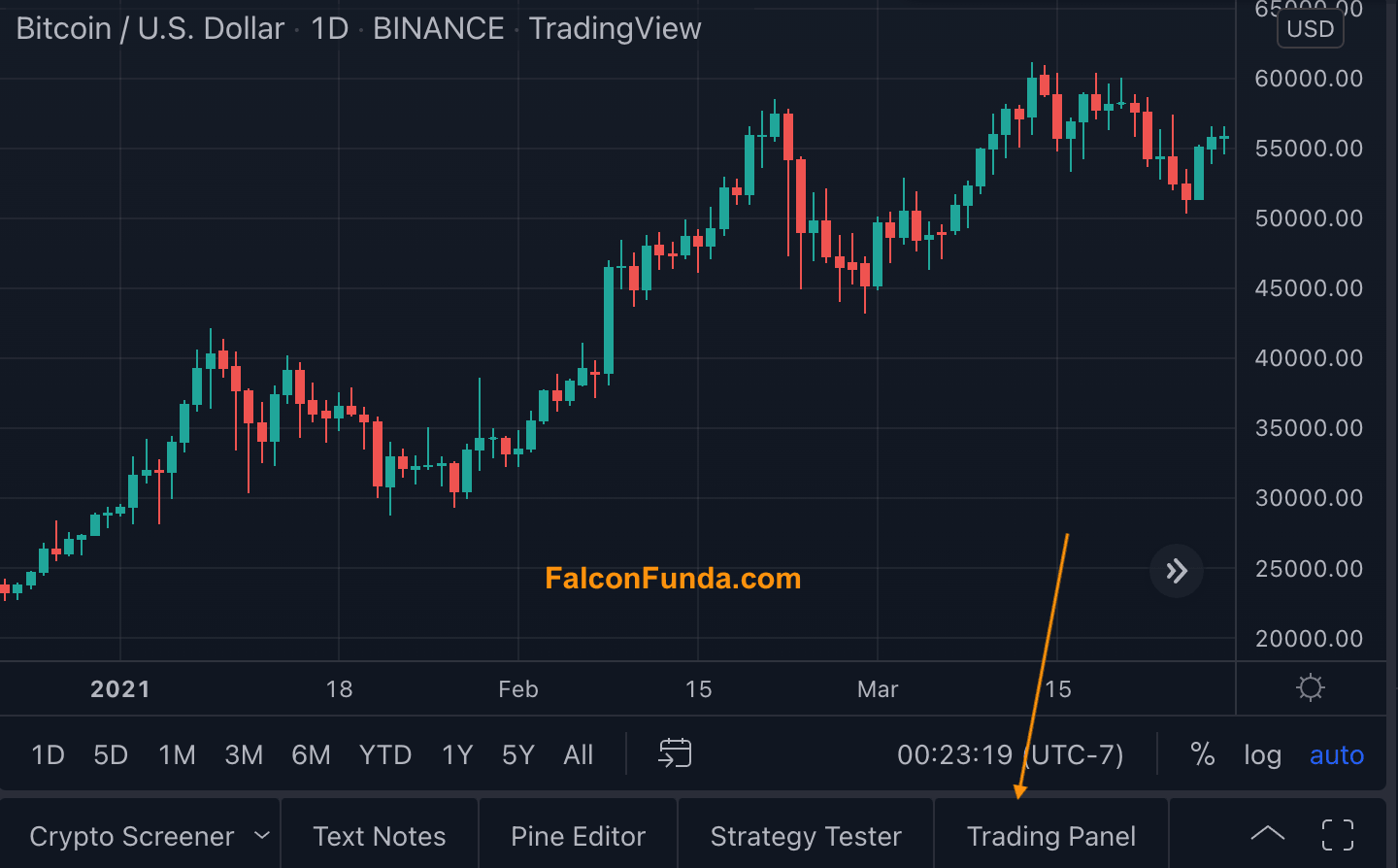
TradingView - Trading Panel - Brokers List

TradingView.com – Trading Panel – Brokers List

Follow the below steps to find a list of all supported brokers for your country & connect :

1 Visit TradingView.com and make sure you are logged in. 
2 Click on the Trading Panel tab text to see a list of all available brokers
3 Place your mouse on the icon of the broker to reveal a ‘Connect’ button.
4 Click on Connect button and follow the instructions on the screen to log in using broker credentials and start placing trades directly from your Tradingview charts.

Here is the full list of supported brokers you can connect with  TradingView :

Alpaca;
AMP;
BingX;
Bitstamp;
Capitalcom;
Chaka;
CQG FCMs: please find the full list here;
Currencycom;
EasyMarkets;
Eightcap.
FOREXcom
FTX;
FXCM;
Gemini;
Global Prime;
iBroker;
IronBeam;
OANDA
Optimus Futures;
Pepperstone;
Saxo;
Tickmill;
Tiger Brokers;
Timex;
TradeStation;
Tradovate;
WH Selfinvest;

Pro Tip:  Click on Paper Trading Icon and use it to practice buying/ selling securities without needing to use real money. 

Next Read :  

How to find an advanced technical summary of your Tradingview chart?

Market Crash 2022

Market Crash 2022

So financial markets have crashed this week and are still very volatile. Here are the most important things you need to know about the market crash.

Market Crash Definition: A market crash happens when indexes ( S&P 500, Dow Jones ) and individual securities ( Stocks, Crypto) prices in the financial markets have a double-digit drop in prices.

Main Reasons for 2022 Market Crash:

  • Recent Bank Interest rate hikes which are primarily driven by inflation.
  • Supply chain / Import-export issues are continuing to happen after being triggered by COVID-19 and the Europe energy crisis with Russia / Ukraine war.
  • : Government selling the assets acquired in the past – during COVID!
  • Investors’ sentiment that economic recession is in progress and panic selling of securities ( Stock, Crypto etc ).

How often do market crashes happen? Recent examples of market crashes are below: 2020 Covid Crash 2010 Flash Crash 2008 Global Financial Crisis & Housing Market Crash 2000 Dotcom bubble Crash1987 Black Monday Crash 1929 Crash & Great Depression

Are we in the bear market?

How long will the bear market last?
Bear markets usually last from months to years. The fact is that most bear markets have shorter life spans than bull markets!

Financial Market Crash Vs Recession?
A financial market crash doesn’t mean there will be a recession but most recessions cause financial market crashes – the 2008 Global Financial crisis for example!

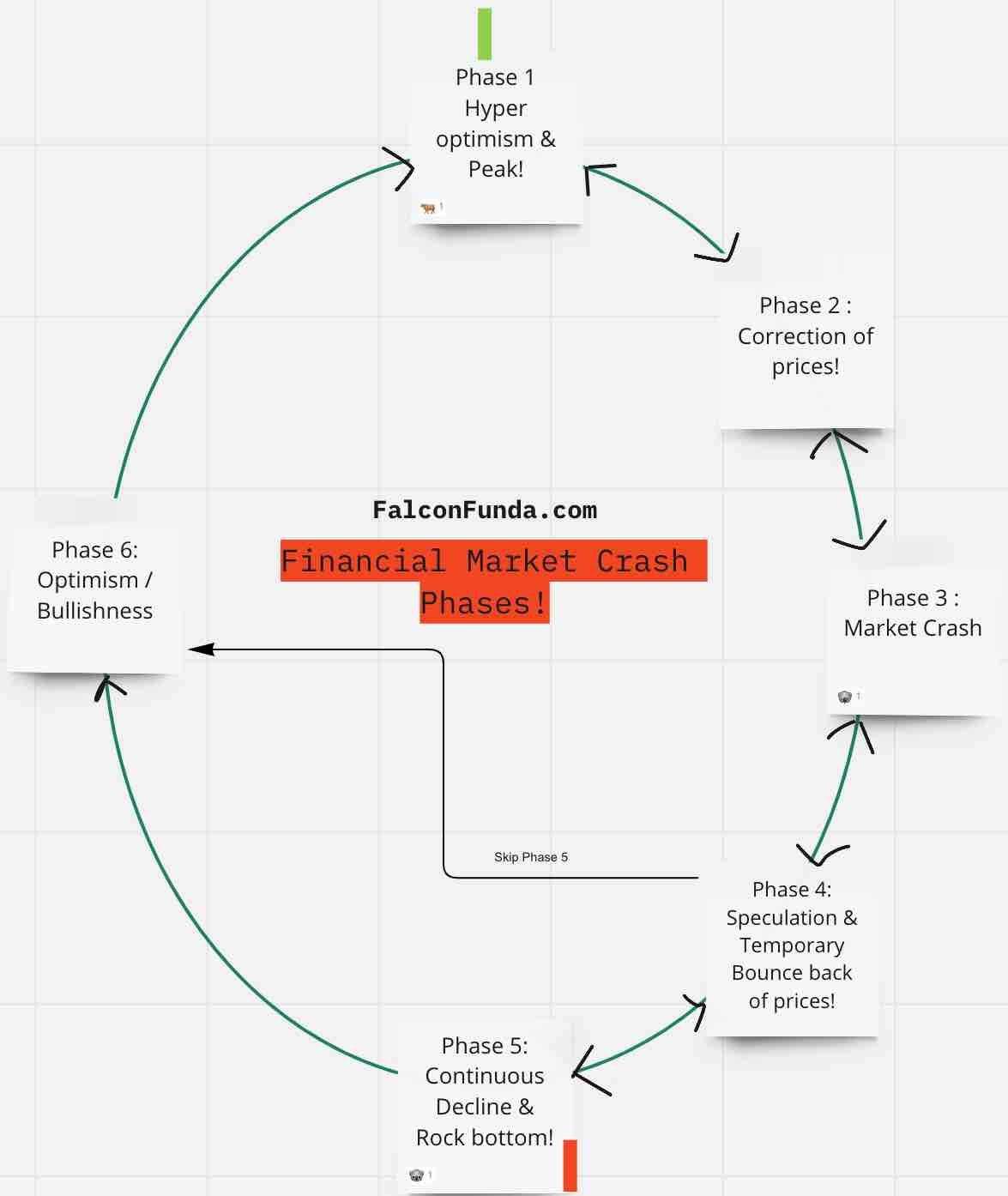
What are the different phases investors/traders go through as part of a Market Crash?

Phase 1: Hyper optimism & Peak!
Phase 2: Correction of prices!
Phase 3: Market Crash
Phase 4: Speculation & Temporary Bounce back of prices!
Phase 5: Continuous Decline & Rock bottom!
Phase 6: Optimism / Bullishness

What happens when the financial market crashes & economic recession happens over a longer time?

  1. Investors lose money.
  2. Investors lose confidence.
  3. Companies/ Businesses struggle to raise money so they lay off employees which leads to less economic output and causes an economic downturn and negative investor sentiment.

What are the most important things you should do as a trader/ investor during a Market Crash?

Consider using a 3(R) strategy to deal with the market crash.

(R)eflect: Reflect on your strategies and goals by going through yourtrading plan.
(R)eview: Review your portfolio/investments/trades and research for market opportunities.
(R)ecalibrate: Act on your reflection, review and research to either buy, sell or hold. Don’t be a sheep!

The best thing you can do during market crashes is to have a healthy cash balance!

PS: What goes up, must come down and What goes down may come up!

How to find advanced technical summary of your Tradingview chart ?

How to find advanced technical summary of your Tradingview chart ?

On your TradingView chart(s), follow the below steps to find an advanced technical analysis summary :
1)Open your TradingView chart.
2)Make sure your watchlist is open on the right-hand side.
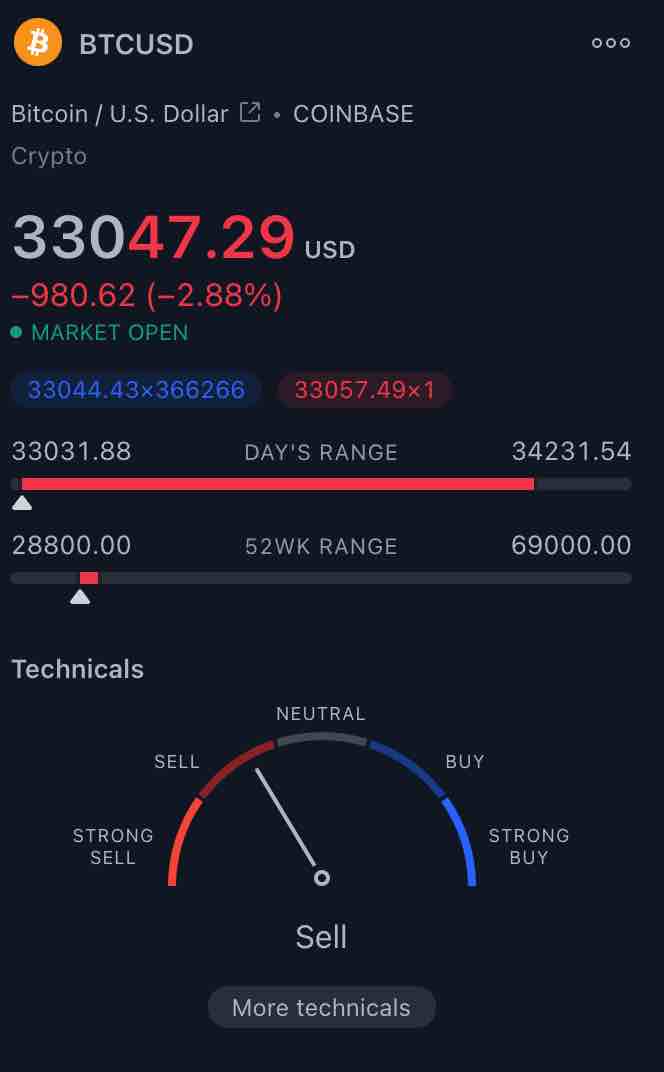
3)On the far bottom right-hand side you will see, the analysis and summary widget.
4)Scroll down until you see the technicals section with Buy/ Sell dashboard.
5) Click on the ‘more technicals’ text – This will open the Technical analysis summary dashboard.
7) Click on different time frame options on the top (minutes/hour / week / month ) to get Moving Averages / Indicators / Pivots data.

Tradingview Charts Technicals - How to find advanced technical summary of your Tradingview chart ?

TradingView Chart Technicals – Click on more technicals!


Tradingview Charts Technicals - Advanced Technical Dashboard

Tradingview Chart Technicals – Advanced Technical Dashboard

Pro Tip: Press Cmd – or Cmd + (Mac ) or Ctrl – or Ctrl + ( Windows ) on your keyboard to Zoom /In or Zoom/ Out of the graph!

Next Read: How to capture an image of your Tradingview chart?