



Recent Updates

We launched AI learning feature.

Fintorro teams Exciting Experience at the London Trader Show 2023 : Highlights, Insights and Learnings

Fintorro teams Exciting Experience at the London Trader Show 2023 : Highlights, Insights and Learnings

London Trader Show with FinTorro-2

Fintorro is a company dedicated to educating people about investing and trading in financial markets through bitesize courses for free for a lifetime. London Trader Show will return in 2025.  In 2024, London Trader Show happened on March 8th and November 1st 2024. 

Introduction 

As an exhibitor, we were thrilled to be a part of such an important event.

This magazine article provides an overview of Fintorro’s experience at the London Trader Show, including the exhibition stand, expert talks, networking opportunities, and insights gained.

Fintorro’s Exhibition Stand:

At the London Trader Show, Fintorro set up an interactive and informative exhibition stand that caught the attention of many attendees. Our team members engaged with visitors, answering their questions about our platform and services. 

Image: FinTorro Exhibition Stand - London Trader Show 2023

Image: FinTorro Exhibition Stand – London Trader Show 2023


We highlighted the bite-sized lessons and playful rewards that make learning about investing and trading fun and engaging. Also, we emphasized that all our courses are entirely free, making them accessible to anyone, regardless of their financial background.
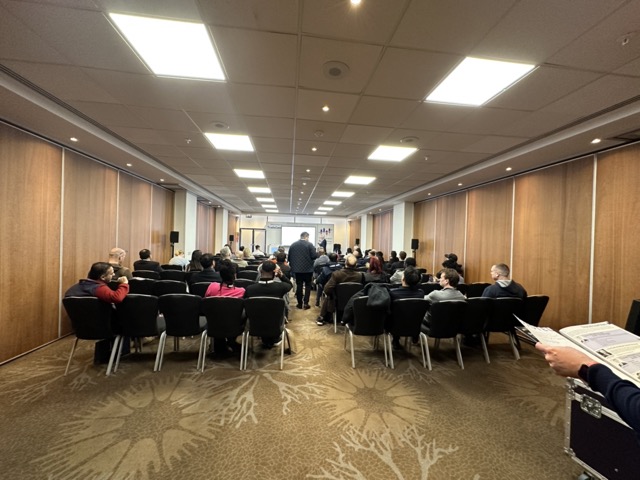
Image: London Trader Show 2023 - Expert Talks Image: London Trader Show 2023 – Expert Talks

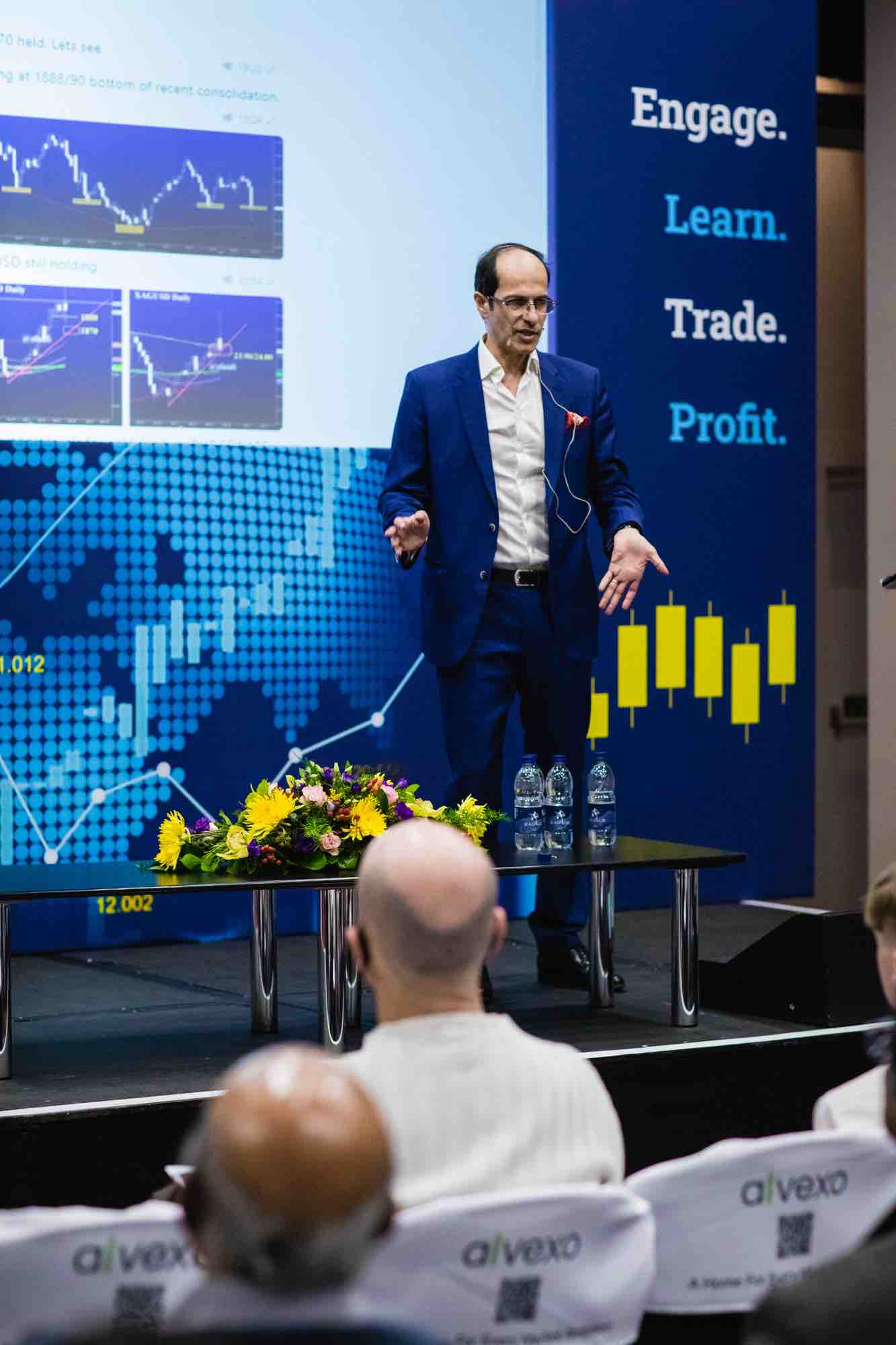
The London Trader Show featured expert speakers and panelists who shared their insights, tips, and experiences in trading and investing. Dr. Mayen Egbe spoke about the importance of emotional intelligence and self-awareness in making rational decisions, while other experts discussed the future of digital assets, swing trading methodology, and achieving exponential growth in trading.

We attended several talks and panels, including those by Saul Lokier, Paddy Osborn, David Paul, and James North.
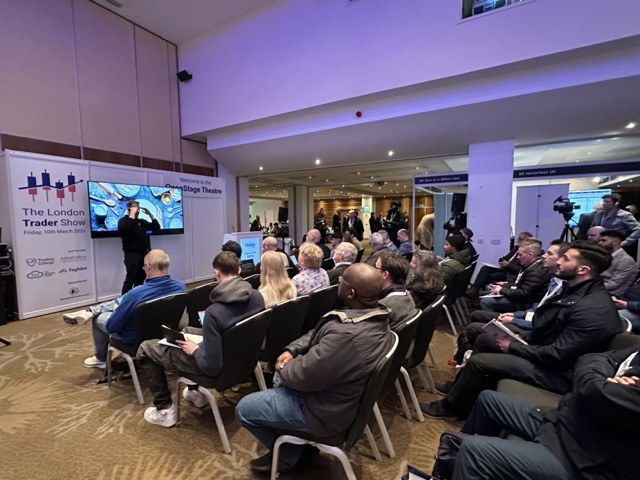
 

Image: London Trader Show 2023 - Expert Talks

LondonTraderShow-Live Trading Demos & Exhibitors

Below are some of the other talks at the event which caught our attention: 

Trade the Pool: One of the most popular talks at the London Trader Show conference was presented by Trade the Pool. Their speaker, Michael Katz, discussed the #1 reason traders fail, and how to fix it. Katz’s talk was well-attended, and attendees praised the actionable advice he provided. Trade the Pool’s exhibition stand was also a hit, with visitors eager to learn more about their proprietary trading platform.

Image: London Trader Show 2023 - Expert Talks

Image: London Trader Show 2023 – Expert Talks

The5ers: Another standout at the London Trader Show conference was The5ers. Their speaker, Saul Lokier, presented on how to achieve exponential growth in trading. The5ers’ exhibition stand was also a popular destination for attendees, who were impressed by the range of trading tools and resources available through the platform.

Image: London Trader Show 2023 - Expert Talks

VectorVest: David Paul from VectorVest gave a talk on a simple-to-execute and high-probability swing trading methodology. His presentation was well-received, and attendees praised the practical advice he provided. VectorVest’s exhibition stand was also a highlight of the conference, with visitors eager to learn more about their trading tools and resources.

                                     

Image: London Trader Show 2023 - Expert Talks

Image: London Trader Show 2023 – Expert Talks

Armchair Trader: Armchair Trader also had an exhibition stand at the conference, showcasing their trading platform and tools. Their stand offered visitors the chance to speak with Armchair Trader representatives, who provided advice and insights into how to use their platform to achieve trading success.


Live Trading Demos and Exhibitors:


LondonTraderShow-Networking - FinTorro Exhibition Stand-1 Medium

Professional traders showcased their skills and strategies in real-time, and Fintorro had the chance to explore many exhibitors, including brokers, platforms, software providers, and financial institutions.

We learned about the latest technologies and innovations in the industry and made valuable contacts.

The People We Met:

At the London Trader Show, we connected with traders and investors from all over the world, impressed with their knowledge and expertise. We also had the opportunity to connect with other exhibitors and sponsors, leaders in the financial industry. It was exciting to learn about their latest products and services and hear about the ways they are helping people achieve financial success.


Insights We Gained:

Attending the London Trader Show provided us valuable insights into the latest trends and developments in the financial industry. We attended a number of seminars and workshops, covering topics such as new trading strategies, trading psychology, and how to optimize profits. Also, we heard from some of the top experts in the industry, who shared their insights and experiences with the audience.

 

LondonTraderShow-Insights We Gained - FinTorro Exhibition Stand-1 Medium

Networking and Gaming:

Finally, we had a lot of fun networking and gaming at the London Trader Show, meeting traders and investors from all over the world, exchanging business cards, and sharing stories and insights. We also played interactive games and challenges, such as a virtual reality trading simulator and a trivia contest on trading history and trends. It was a great way to unwind and have fun while exploring the world of trading and investing.

Conclusion:

The London Trader Show 2023 was an incredible opportunity for Fintorro to connect with experts, traders, and investors from all over the world, and gain valuable insights into the latest trends and developments in the financial industry.

The talks and exhibition stands of other companies also drew in large crowds, showcasing the diversity and vibrancy of the trading industry. If you missed out on the London Trader Show conference this year, be sure to mark your calendar for next year’s event!

We look forward to attending future events and continuing to educate and inspire people about the world of trading and investing.

Next Read:  FinTorro Mobile App



Join the Global Trading Community of Trading Experts, Speakers in London

Join the Global Trading Community of Trading Experts, Speakers in London

London Trader Show 2024:

London Trader Show 2022 FinTorro-224


Are you looking to improve your trading skills and stay up-to-date with the latest industry trends? 

Join Top Industry Experts and Learn the Latest Trading Techniques 


Then you won’t want to miss the London Trader Show 2024 on March 8th. This event offers an unparalleled opportunity to hear from people in the industry who are actively trading and have valuable insights and expertise to share with attendees.

Speakers and Presenters You Don’t Want to Miss at London Trader Show


London Trader Show 2022 FinTorro-180


London Trader Show 2022 FinTorro-230 

This year’s line-up of speakers and presenters includes top experts such as

  • Saul Lokier,
  • Michael Katz,
  • Paddy Osborn,
  • David Paul,
  • Adam Harris,
  • James North,
  • Dr Mayen Egbe,
  • Glen Goodman,
  • George Hallmey,
  • Rob Carver,
  • Gil Ben Hur,
  • Lee Sandford,
  • Jason Graystone,
  • Ashraf Laidi,
  • Paul Wallace,
  • Rajan Dhall,
  • Alex Spiroglou,
  • Sylvia Marshall,
  • James Proudlock,
  • Nadira Tudor,
  • Clive Arneil,
  • Karim Yousfi,
  • Federica D’Ambrosio,
  • and Matthew Jackman.


London Trader Show 2022 FinTorro-228

Unbeatable Learning Opportunities at London Trader Show

The London Trader Show 2024 offers a variety of workshops, seminars, and panel sessions covering topics such as new trading strategies, trading psychology, how to get started, and how to optimize your profits. You’ll also have the chance to attend live trading demos with in-the-moment commentary and chat with exhibitors and sponsors worldwide.

Book Your Free VIP Silver Tickets Now


Fintorro-London-Trader-Show-2023-Coupon

Don’t miss out on this opportunity to become a consistently successful and profitable trader.

Book your free VIP silver tickets now using the below which includes FinTorro VIP silver ticket.

We look forward to seeing you at the London Trader Show 2024.


How Bollinger Bands Can Improve Your Trading Strategy ?

How Bollinger Bands Can Improve Your Trading Strategy ?

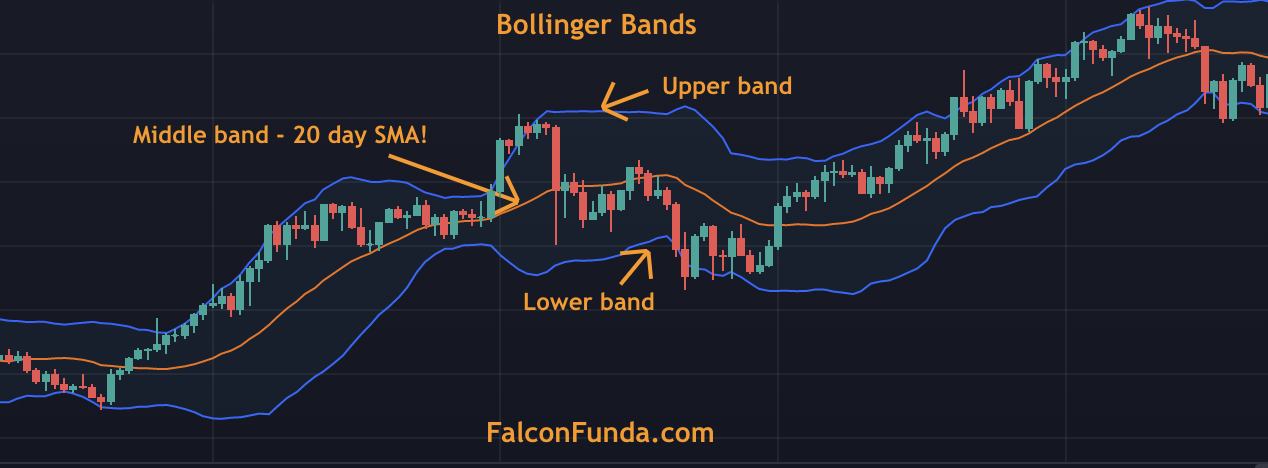
Bollinger Bands are a popular chart overlay indicator for traders and investors to measure market volatility.

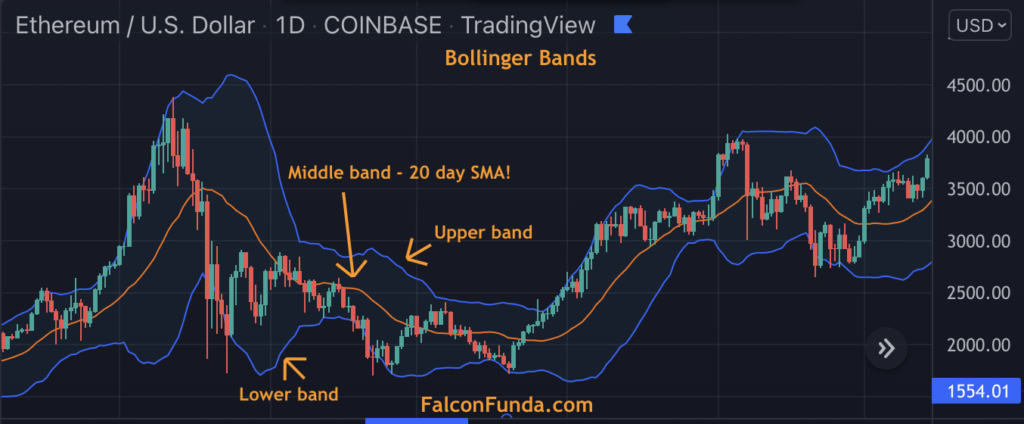
Bollinger Bands on a TradingView Price Chart

Bollinger Bands indicator applied onto Ethereum TradingView chart!


How to interpret Bollinger Bands on the chart ? 

These bands can be found under indicators on charting tools like TradingView and consist of three entities – the upper band, the middle line (which is a 20-day Simple Moving Average by default), and the lower band.

The upper band is located two standard deviations above the middle line, while the lower band is located two standard deviations below the middle line. Traders and investors use Bollinger Bands to interpret market trends and signals.


What is Bollinger Squeeze and how to find it on Chart ? 

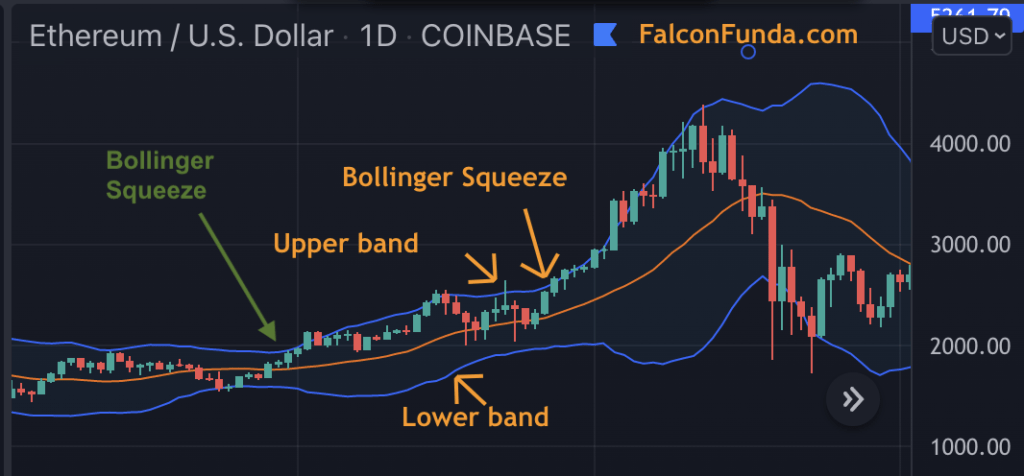
When applied to a price chart, wider Bollinger Bands indicate higher price volatility, while narrow bands indicate price stability. To look for trends and signals using Bollinger Bands, traders and investors typically watch for a “Bollinger squeeze,” which occurs when the upper and lower bands come closer to the moving average line. This can signal an uptrend, and traders will watch for the price to move above the upper band continuously.


What is Bollinger Bounce ? 

When the price reaches the upper band and moves back towards the middle band, it is called a “Bollinger bounce.” Traders will typically look for continuous downward movement of the price below the lower band, indicating a downtrend. The upper and lower bands can also act as support and resistance levels.

It’s important to remember that, like all other indicators and patterns, Bollinger Bands should be used in conjunction with other technical analysis tools for best results. By following these guidelines, traders and investors can make more informed decisions and improve their trading strategies.

What does Bollinger bands represent on the price chart ? 

When applied to the price chart, Bollinger bands represent price volatility. Wider bands mean higher price volatility and narrow bands mean price stability. 

Looking for trends & signals using Bollinger Bands? 

Bollinger Bands and Bollinger Squeeze Example on TradingView Chart

Bollinger Squeeze

On the security price chart, if the upper and lower Bollinger bands come closer to the moving average line, traders/investors usually lookout for price moving higher up above the upper band continuously i.e uptrend. This is the Bollinger squeeze.

Bollinger Bounce Example

Bollinger Bounce!


Practice Bollinger Bands – Beginner

Practice Bollinger Bands – Intermediate

Practice Bollinger Bands – Advanced

Practice Bollinger Bands – Expert


Next Read: Exponential Moving Averages

Tower Top and Tower Bottom Pattern

Tower Top and Tower Bottom Pattern

Introduction

Tower Top and Tower Bottom are multi-day trend reversal candlestick patterns that traders use to identify potential reversals in the market.

What is Tower Top Candlestick pattern?

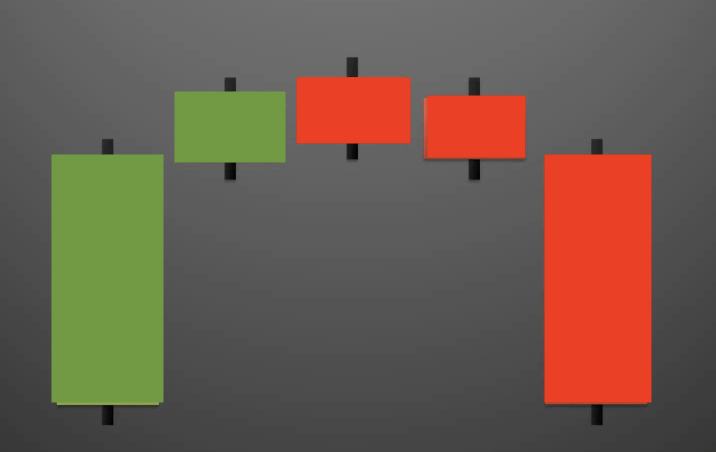
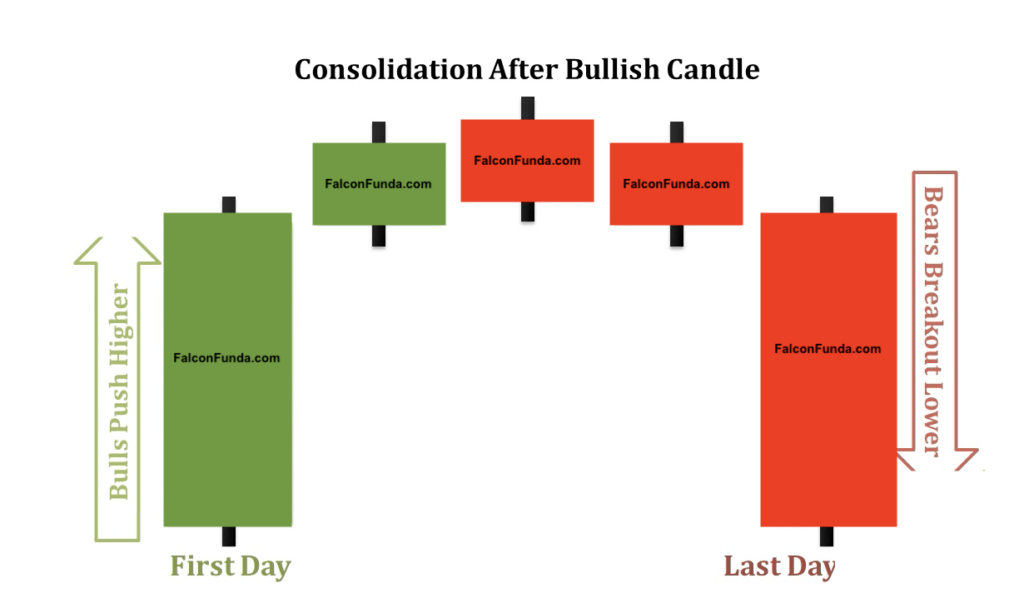
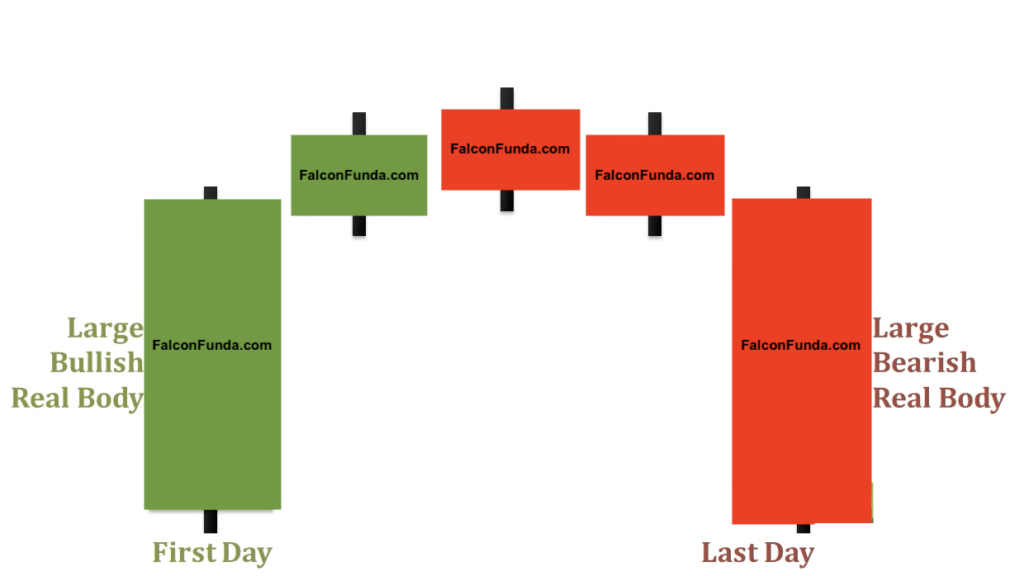
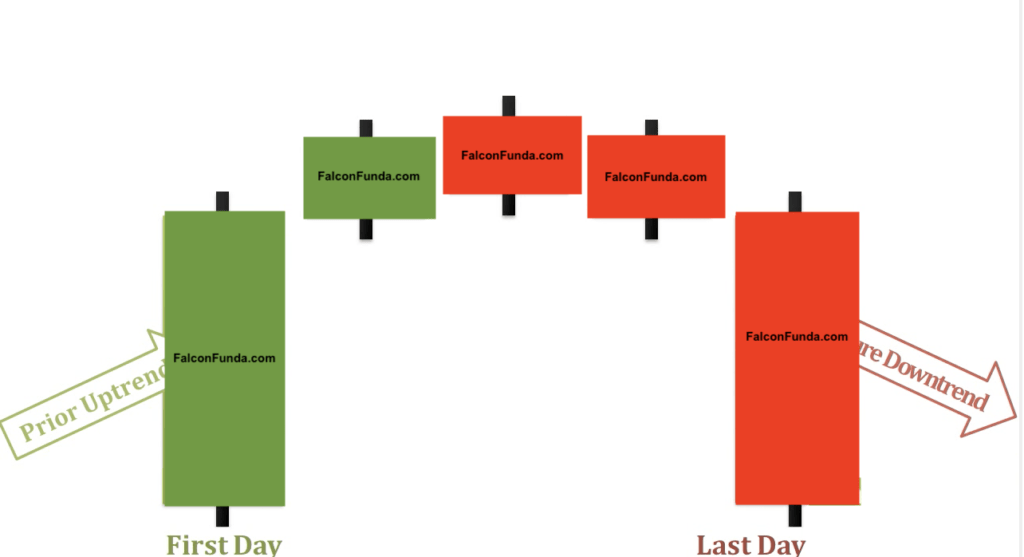
The Tower Top pattern occurs after an uptrend. On Day 1, there is a longer bullish candlestick, followed by a few smaller body candlesticks. Finally, on the last day, a large bearish candlestick appears, completing the formation of the tower. The left-most and right-most candlesticks make up the two sides of the tower, while the middle candlesticks act as the roof.

The psychology behind the Tower Top pattern is that the bullish candlestick on Day 1 confirms the previous uptrend. However, subsequent days of small body candlesticks indicate that momentum has slowed down. The large bearish candlestick on the last day suggests a change in sentiment, indicating a potential reversal.

To identify Tower Top patterns on your TradingView chart, follow these steps:

  1. Open your TradingView chart
  2. Make sure you are connected to your broker
  3. Look for a longer bullish candlestick followed by smaller body candlesticks and a large bearish candlestick on the final day
  4. Keep in mind that the left-most and right-most candlesticks should make up the two sides of the tower, and the middle candlesticks should act as the roof.

Why is Tower Top Candlestick pattern important ? 

By learning to identify the Tower Top pattern and its psychology, traders can make informed decisions and potentially profit from market reversals.

Tower Top Pattern multiple day trend reversal patterns-1  Tower Top Pattern multiple day trend reversal patterns-2


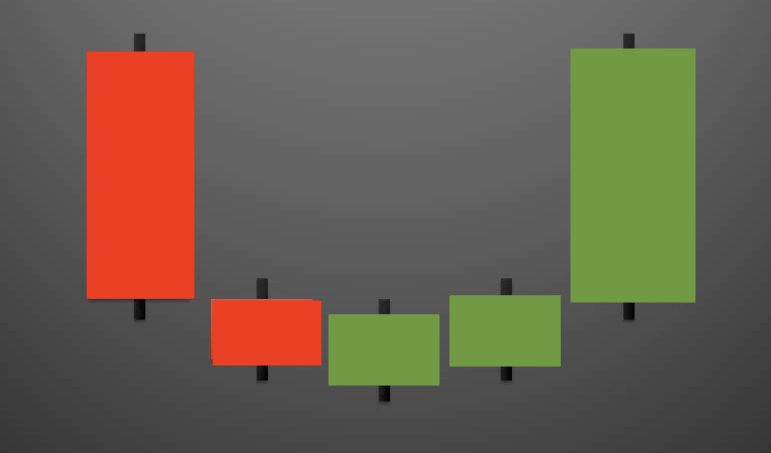
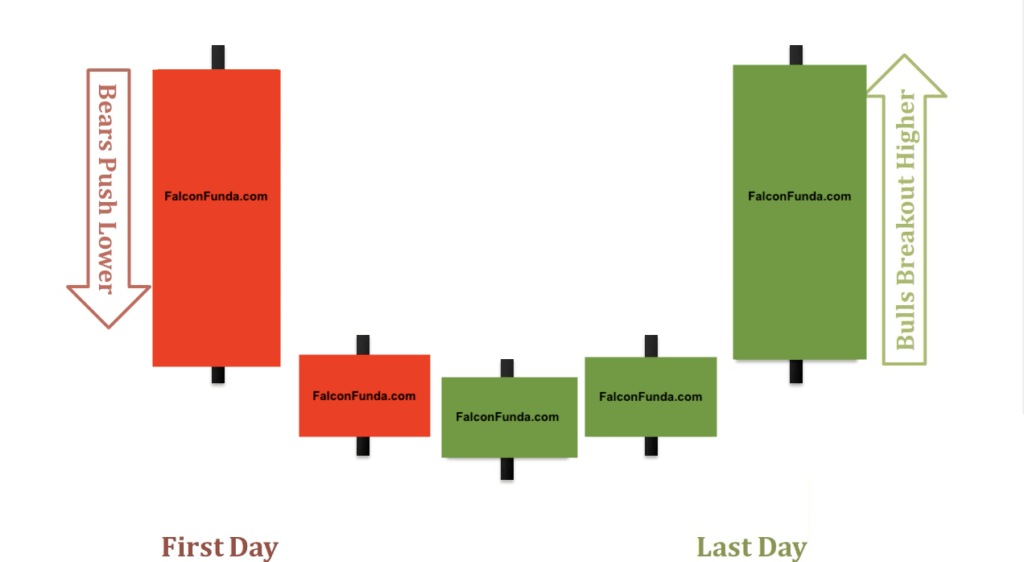
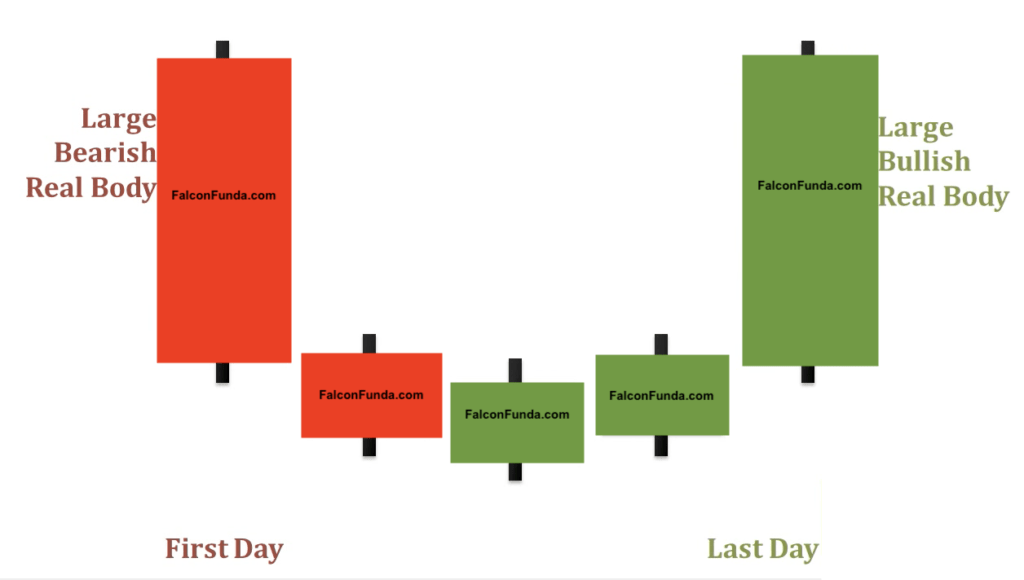
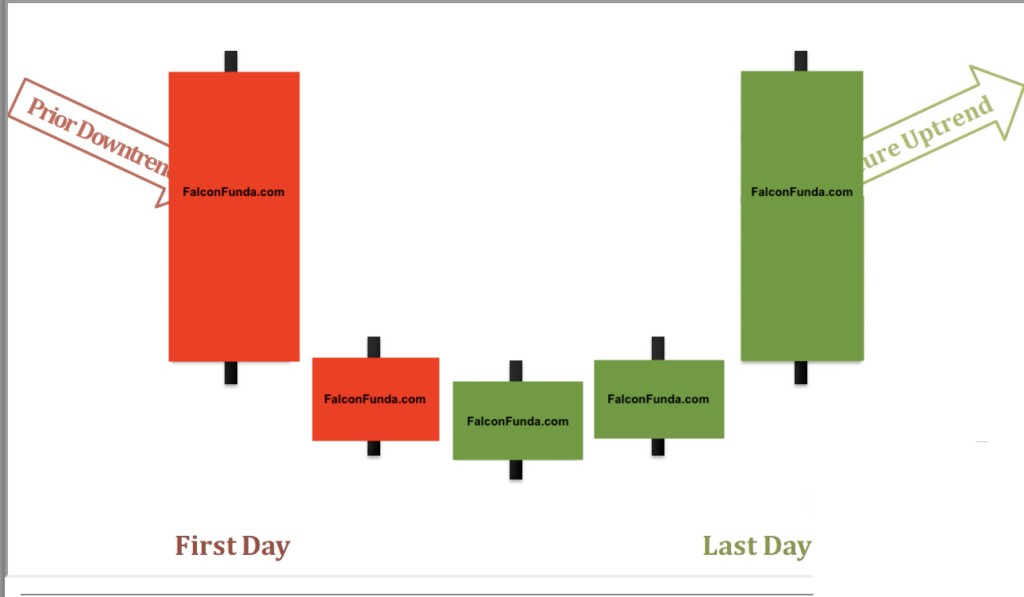
Tower Bottom Pattern

Tower Bottom Pattern multiple day trend reversal patterns -1


Tower Bottom Pattern multiple day trend reversal patterns-2  TowerBottomPattern-3


Tower Top Pattern multiple day trend reversal patterns-3


Tower Bottom Pattern multiple day trend reversal patterns-3


Start Learning

Next Read:  What is Support and Resistance ?


Tri-Star Pattern

Tri-Star Pattern

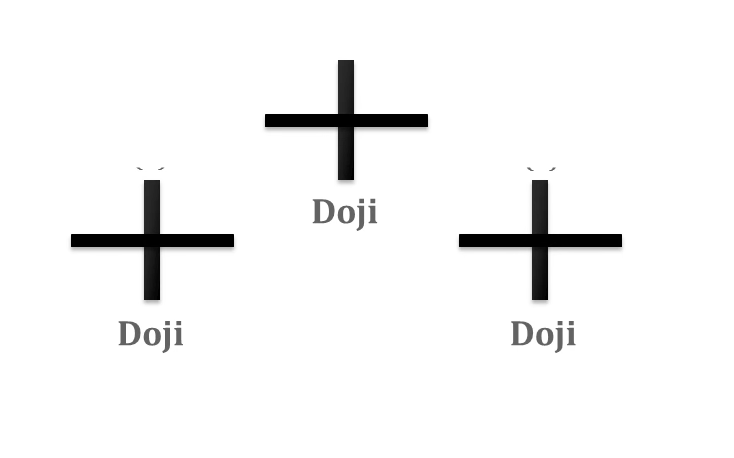
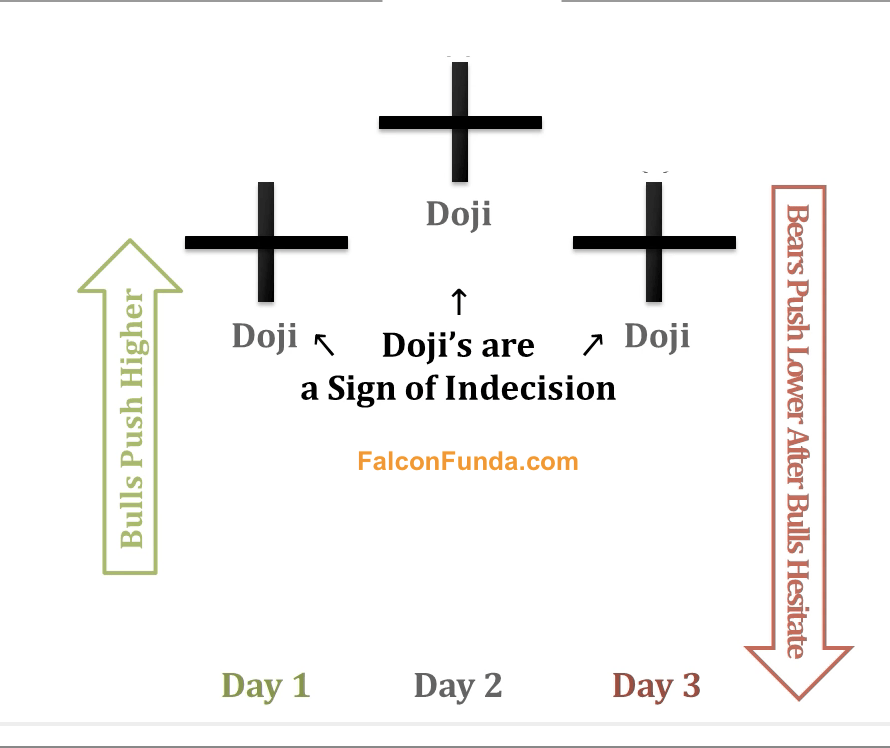
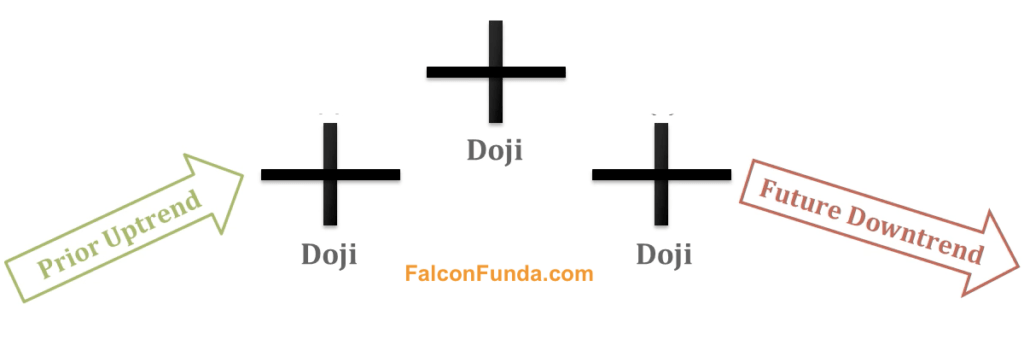
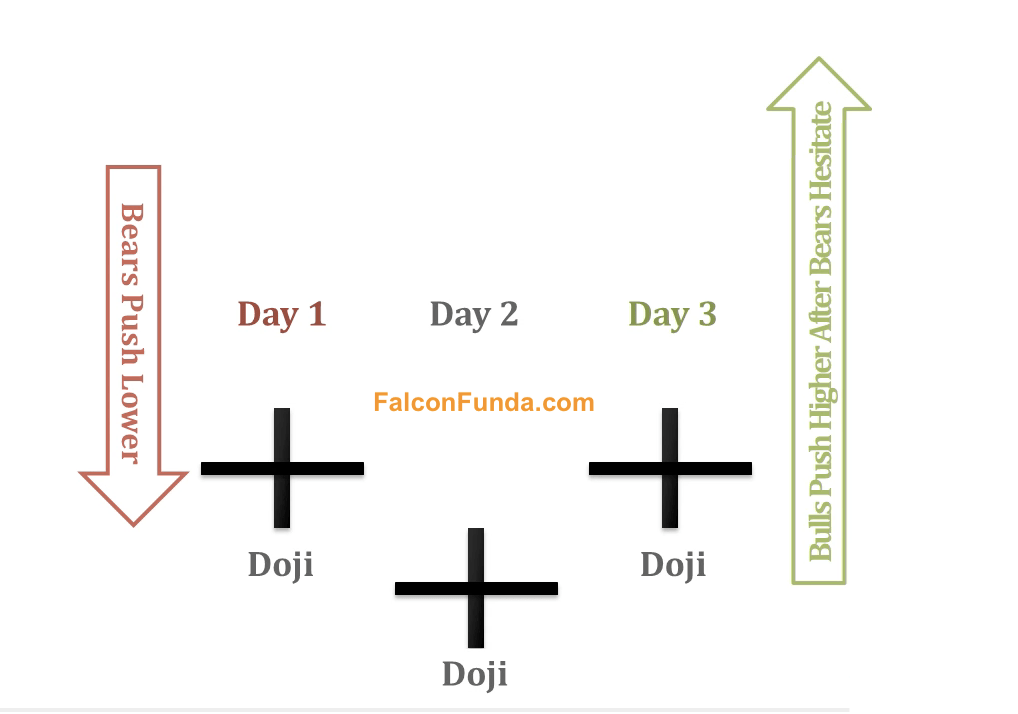
The Tri-Star Candlestick Pattern is a three day trend reversal pattern which has three doji’s.

A Tri-star Top pattern happens after a uptrend. Day one is a doji. Second day is Doji again that gaps up above the day 1 open & close price. Day 3 is also doji and it is under the open& close of the middle day doji.

  Tri-Star Candlestick Pattern - Top - 2  Tri-Star Candlestick Pattern - Top -1

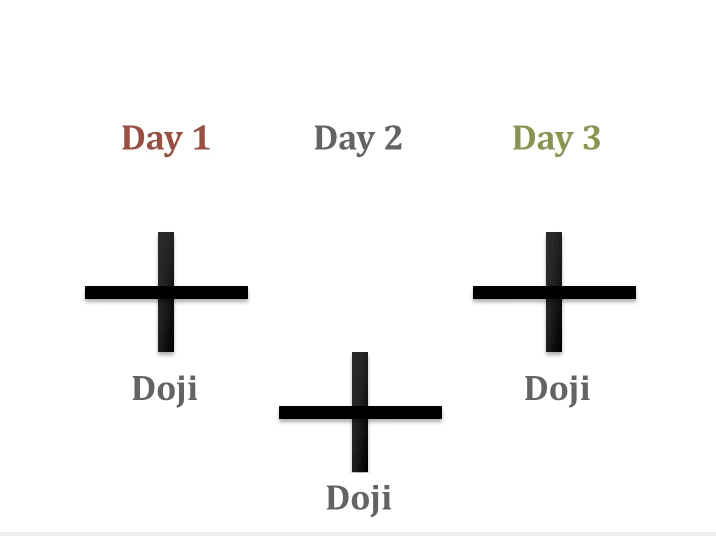
A Tri-star Bottom pattern happens after a downtrend.. Day one is a doji. Second day is Doji again that gaps down below  the day 1 open & close price. Day 3 is also doji and it is over  the open & close of the middle day doji.
Tri-Star Candlestick Pattern - Bottom -1

 Tri-Star Candlestick Pattern - Bottom-3


Psychology of Tri-Star  pattern is that after an upward trend a doji appears which is a sign of indecision. Two more doji’s over next successive days indicates that the previous trend is slowing down and bulls’ power is growing for the Tri-Star Bottom pattern and vice-versa for the Tri-Star Top pattern.


Tri-Star Bottom Pattern Candlestick- 2

Practice Tri-star Pattern – Beginner

As like any other, Tri-Star pattern require sconfirmation in the following days.If future day candlesticks go above the last day candlestick(s)  the pattern is voided. You can identify Tri-Star pattern by applying it from indicators list on your TradingView chart.

Next Read:   Tweezer Candlestick Pattern

How to export tradingview chart data to a CSV file?

Introduction:

TradingView is a powerful tool that helps traders make informed decisions. However, it can be challenging to track your positions, orders, and trading history in TradingView alone. Luckily, it’s possible to export your TradingView chart data to a CSV file. In this article, we’ll provide step-by-step instructions on how to do this.

Step-by-Step Instructions:

  1. Open your TradingView chart.
  2. Make sure you’re connected to your broker.
  3. Click on your broker name in the bottom panel of the TradingView screen to show a dropdown.
  4. Click on “Export Data.”
  5. In the pop-up window, select what you want to export from the dropdown menu. You can choose from positions, orders, history, trading account history, and trading journal.
  6. Press the “Export” button.
  7. Check your Downloads folder (or default file save folder) for a downloaded CSV file with your exported TradingView data.

Why Downloading Your TradingView Chart Data is Important ?

Exporting your TradingView data to a CSV file allows you to analyze it in more detail. By looking at your positions, orders, and trading history outside of TradingView, you can identify patterns and trends that you might not have noticed otherwise. You can also use this data to track your progress and make informed decisions about your trading strategy.

Conclusion ?

Exporting your TradingView data to a CSV file is a simple process that can provide valuable insights into your trading performance. By following the step-by-step instructions we provided, you can easily download your positions, orders, history, trading account history, and trading journal data into a CSV file. Remember to check your Downloads folder or default file save folder for the downloaded file.

Watch this Video: 

[convertkit form=3305625]

Read Next:  How to apply exponential moving average indicator onto Tradingview charts?

Advance Block Pattern

Advance Block Pattern

The Advance Block candlestick pattern is a three-day formation.

Introduction :

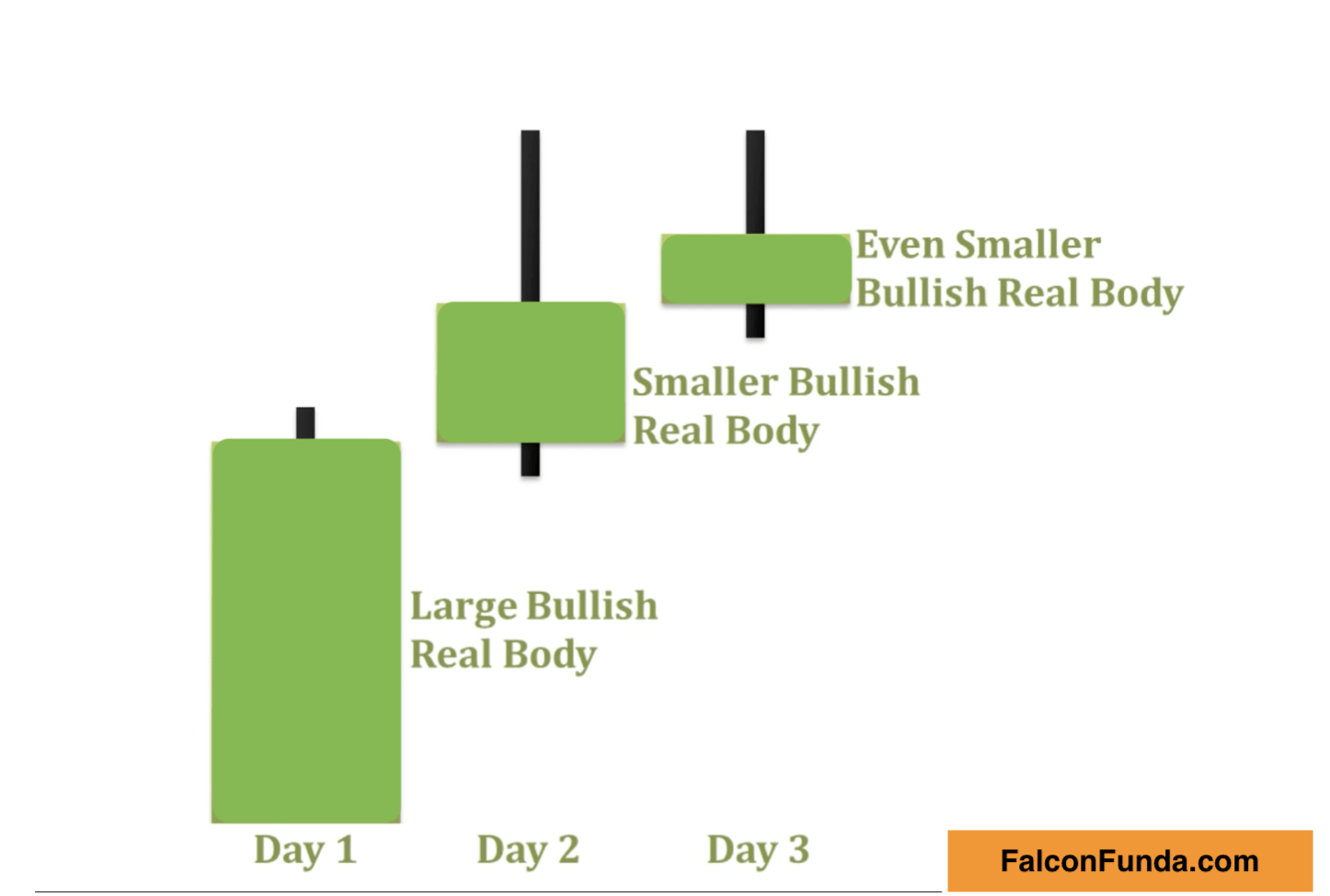
The Advance Block candlestick pattern consists of three consecutive bullish candles.
• While the security is making new highs, the real bodies of the bullish candles are getting progressively smaller.
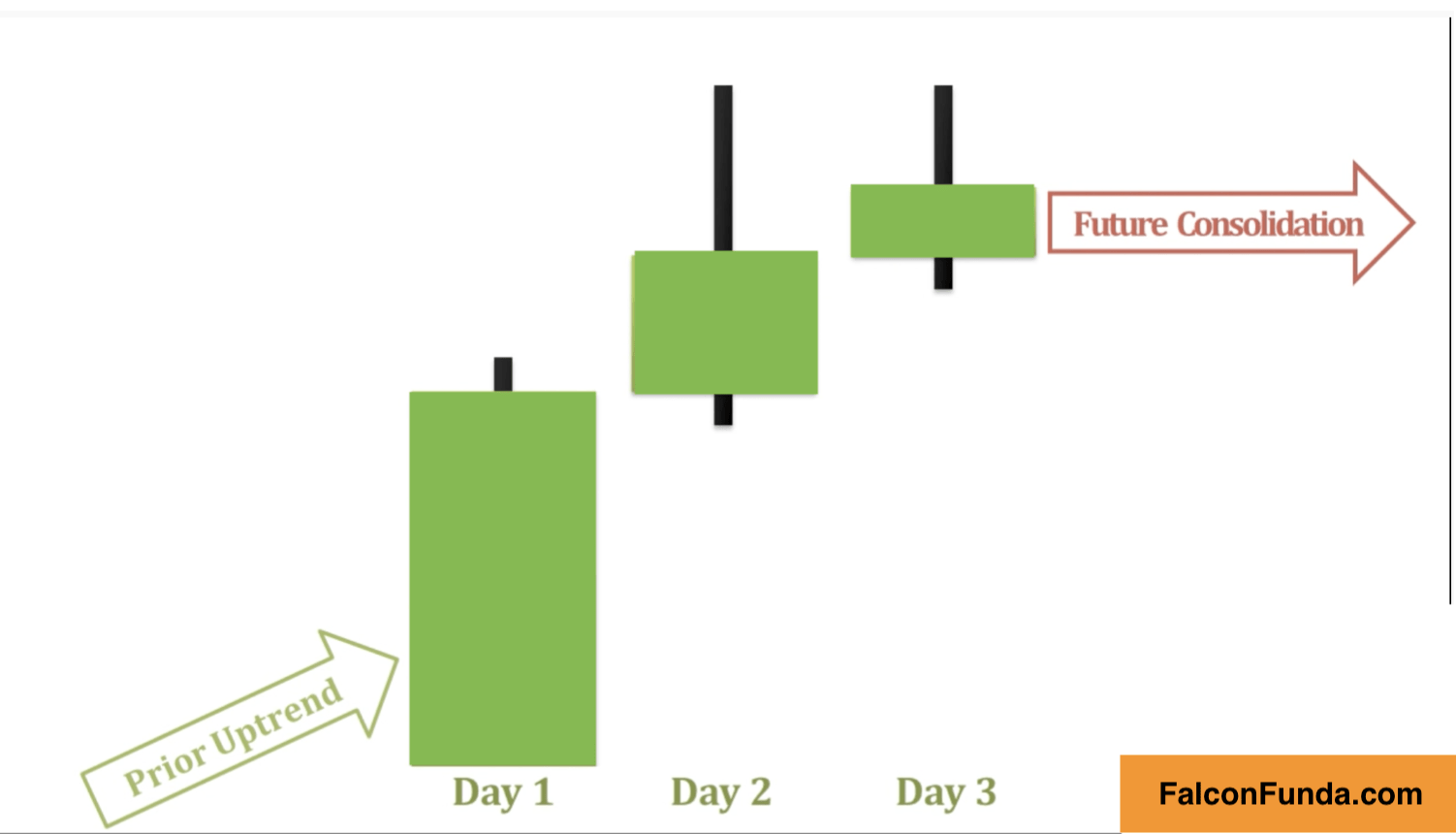
• This pattern typically occurs during an uptrend, and while it doesn’t necessarily indicate a reversal, it can be a warning sign of a slowing uptrend.

What is Advance Block Candlestick pattern ? 

The Advance Block candlestick pattern is a three-day formation that traders use to identify potential changes in an uptrend’s momentum. This pattern typically occurs during an uptrend, and while it doesn’t necessarily indicate a reversal, it can be a warning sign of a slowing uptrend.

The Advance Block pattern consists of three consecutive bullish candles.

The first candle is a long bullish candle that signifies a strong buying presence in the market.

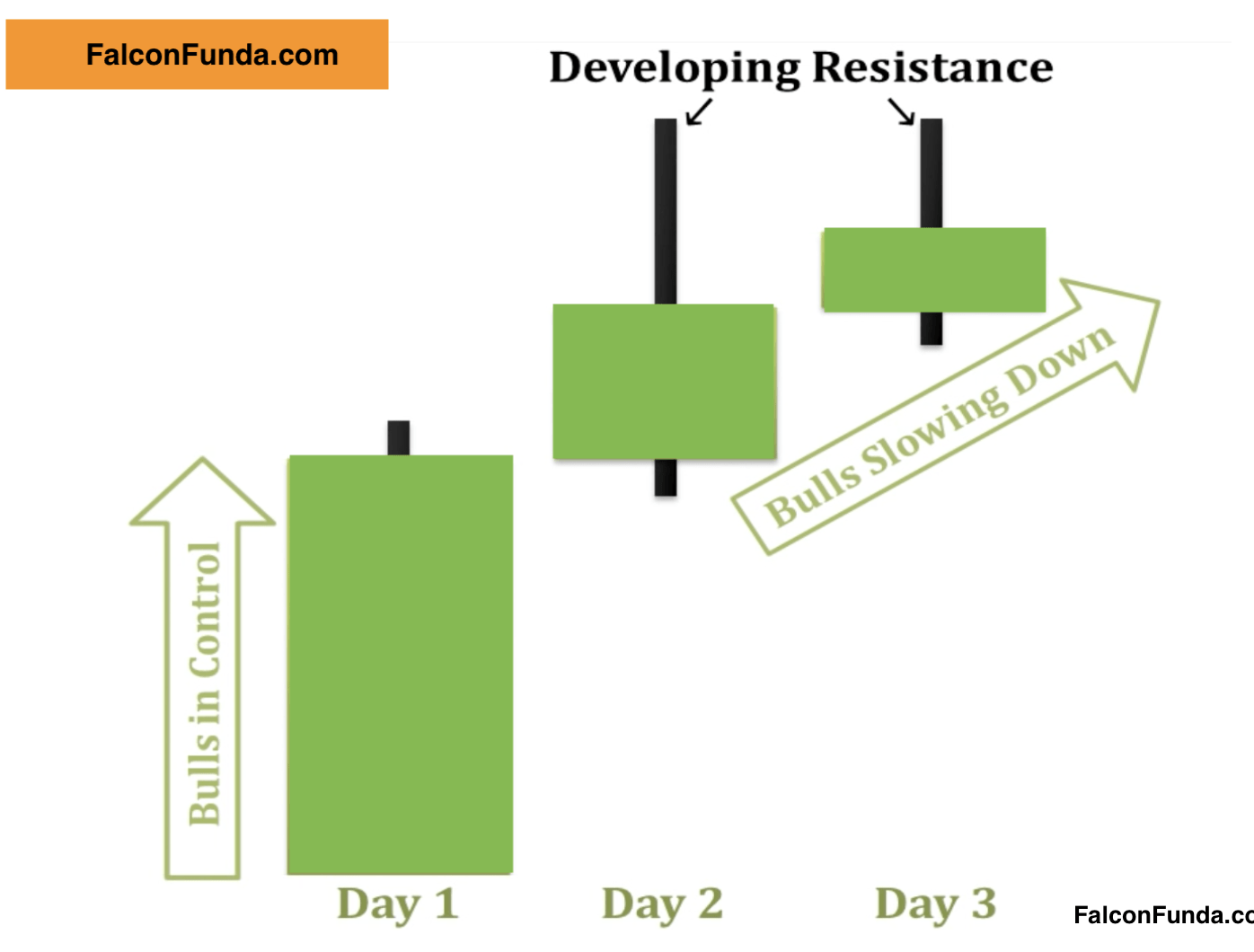
The second day brings another long bullish candle that opens within the real body of the first day’s candle, and closes above the high of the first day. It also features a long upper shadow, indicating that buyers are still pushing the price higher, but encountering some resistance from sellers.

The third day is a small bullish candlestick that usually opens within the second day’s real body and closes above its close, also featuring an upper shadow.


Advance Block Pattern 2

                                                                                                                                                       Advance Block Pattern Candlesticks

Advance Block Pattern 1

                                                                                                                                                                  Advance Block Candlestick Pattern

Advance Block Pattern 3

                                                                                                                                        Advance Block Candlestick Pattern

Why is Advance Block  Candlestick Pattern important ? 

The psychology behind this pattern is that while the security is making new highs, the real bodies of the bullish candles are getting progressively smaller, signaling a potential weakening of the bullish momentum.

The upper shadows show that buyers are still trying to push prices higher, but bears are successfully pushing the price down from its highs, leading to gradually smaller gains for the bulls.

By identifying the Advance Block pattern, traders can potentially take advantage of the slowdown in the uptrend by exiting long positions or hedging against potential losses. It is a useful tool for technical analysis and should be included in any trader’s arsenal.

As like any other, Tri-Star pattern require sconfirmation in the following days.If future day candlesticks go above the last day candlestick(s)  the pattern is voided. You can identify Tri-Star pattern by applying it from indicators list on your TradingView chart.

 Start Learning


Next Read: Tri-Star Candlestick Pattern

How to add a text note to your TradingView chart ?

How to add a text note to your TradingView chart ?

Are you looking for an easy way to capture your trading ideas, thoughts, notes and observations? . Adding a text note to your TradingView chart symbol is a great way to keep track of your insights.

Here’s how you can add a text note to your TradingView chart symbol in just a few simple steps:

  1. Open your TradingView chart.
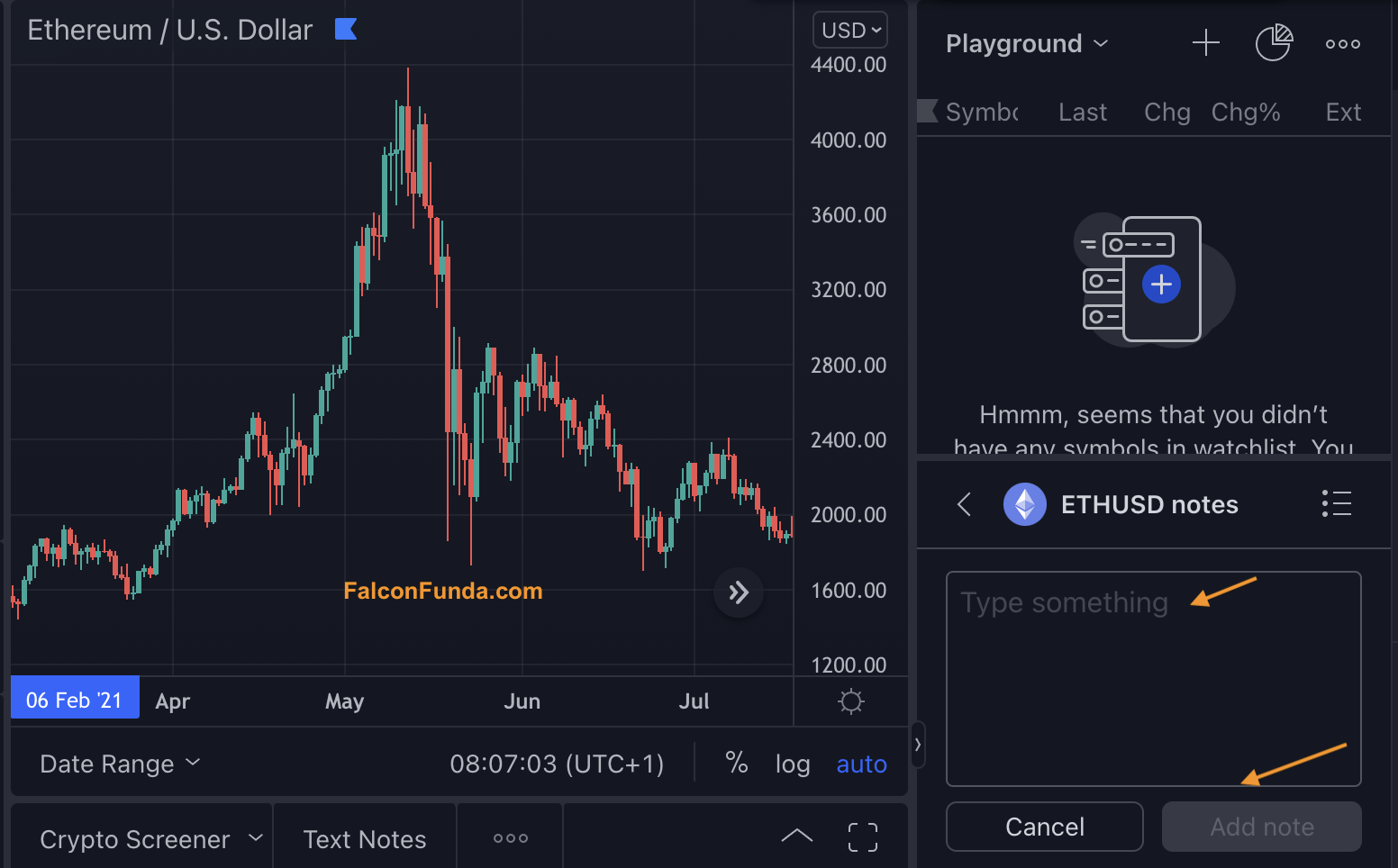
  2. Right-click on the chart and choose the ‘Add Text note for …’ option. Alternatively, you can press Alt+N (Mac) or Option+N (Windows) on your keyboard to open a new text note.
  3. In the side window that opens up, you’ll see your watchlist at the top and a text box with ‘Type Something’ towards the bottom right-hand side.
  4. Write your text note in the ‘Type Something’ box.
  5. Click on ‘Add note’ to save your note.
  6. Repeat steps 2-5 every time you want to capture a note.

By following these steps, you can easily add a text note to your TradingView chart symbol and keep track of your ideas, thoughts, and observations. Give it a try and see how it can help improve your trading.

Remember, capturing your notes is crucial to your success as a trader.

It allows you to review your thoughts and ideas and make better-informed decisions in the future. So, don’t hesitate to add notes to your TradingView chart symbols!

Next Read: How to export TradingView chart data ?

A Beginner’s Guide to Using Moving Averages in Technical Analysis

A Beginner’s Guide to Using Moving Averages in Technical Analysis

Introduction:

Moving averages are popular technical analysis indicators used by traders and investors to identify the direction of upward or downward trends in securities. In this article, we’ll explore the different types of moving averages and how they can be used to derive trends in financial markets.

Type of Moving Averages

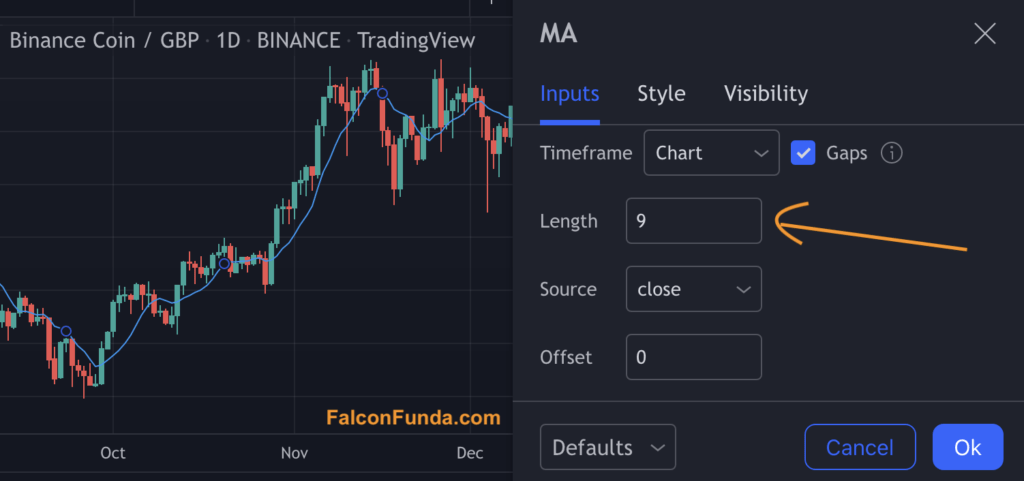
There are several varieties of moving averages, including the Simple Moving Average (SMA), the Exponential Moving Average (EMA), and the Weighted Moving Average (WMA). The length of the moving average is a crucial parameter that traders consider to identify trends.

  1. Simple Moving Average (SMA): An arithmetic mean of security prices over a set number of days, typically 10, 20, 50, 100, or 200. The length of the moving average is an important parameter that traders use to identify trends.
  2. Exponential Moving Average (EMA): A weighted average that places greater emphasis on recent price action.
  3. Weighted Moving Average (WMA): This is similar to the exponential average, but with equal weight given to each day.

Steps to apply Moving Averages onto TradingView Charts :

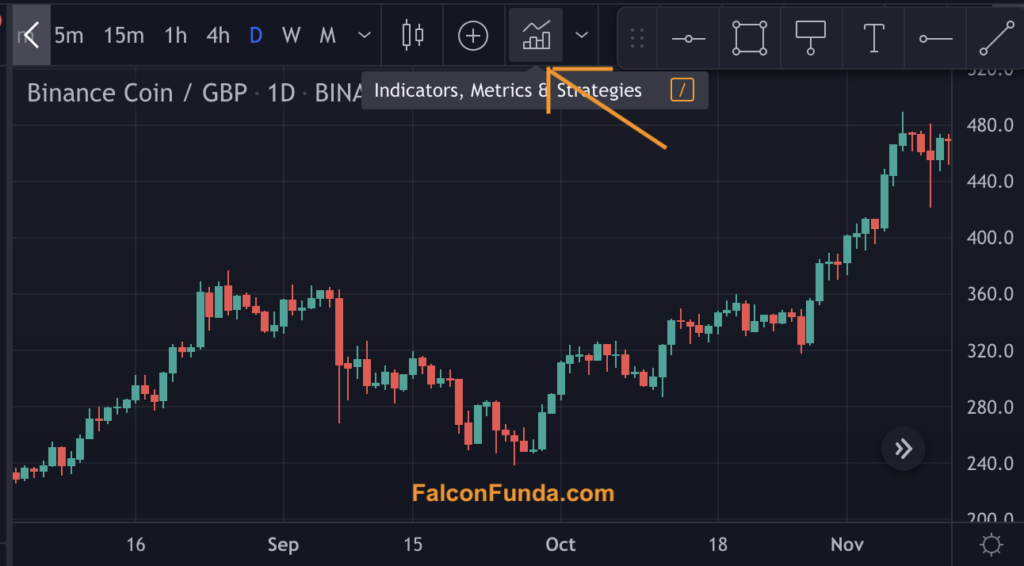
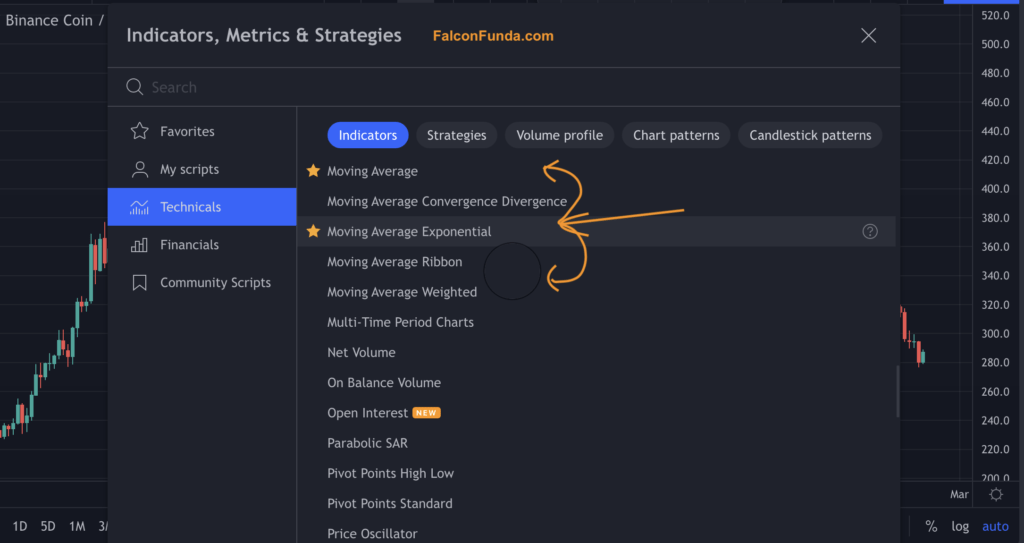
Follow the instructions in below images to apply Moving Average indicator on TradingView Chart.

TradingView Indicators - Moving Averages Step 1

Instruction: Go to Indicators


TradingView Indicators - Moving Averages - Step 2

Instruction: Select the Moving Average


TradingView Indicators - Moving Averages - Step 3

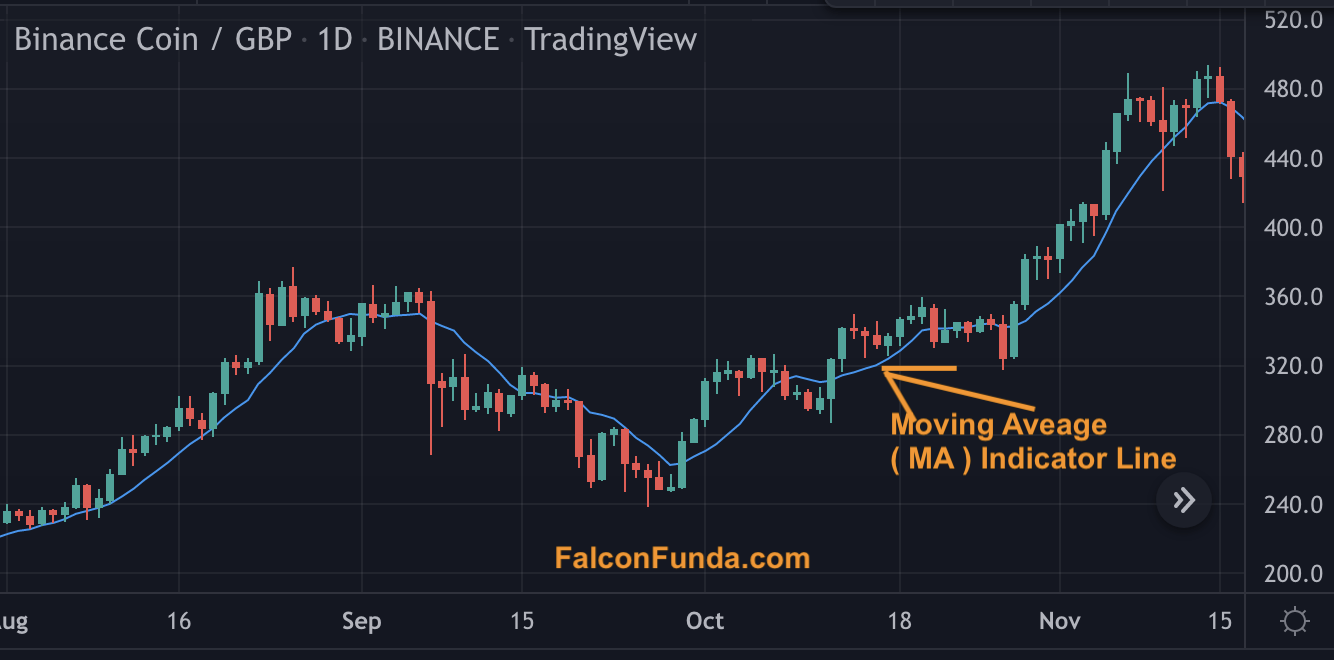
Instruction: See the moving average line displayed on the chart

TradingView Indicators - Moving Averages - Step 4

Instruction: Adjust the moving average line parameters by double clicking on the line


Psychology of Moving Average Indicator:

The underlying psychology of the moving average indicator is that it smooths out price fluctuations. Average price is calculated over a set number of days. Accordingly, raders can use the direction of the moving average line on a price chart to determine whether a security is in an uptrend, downtrend, or ranging.

After applying the moving average indicator, if the price of the security is above the moving average line, it signals an uptrend. If the price of the security is below the moving average line, it signals a potential ongoing price reversal based on the moving average.


Strategies to identify Moving Average Indicator: 

Traders often use crossover strategies to identify trend and sentiment changes in financial markets. There are two primary types of crossover strategies:

  1. Price crossover strategy: This involves identifying when the price of a security crosses themoving average line. If the price is above the moving average line, it indicates an uptrend. If the price is below the moving average line it signals a downtrend.
  1. Moving Average Overlap strategy: This involves applying two moving averages (one shorter-term and another longer-term) on the same price chart of a security. The point at which these two moving average lines merge is known as a crossover. Traders consider the sentiment to be bullish if the security consistently moves above the crossover, and bearish if it moves below.

Conclusion:

Moving averages are a powerful tool in the technical analysis toolkit that traders and investors can use to identify trends and sentiment changes in financial markets.

By understanding the different types of moving averages and their application in crossover strategies, traders can make more informed investment decisions. So, to stay ahead in the markets, it’s important to incorporate moving averages into your technical analysis strategy.

Practice Moving Average – Beginner

Practice Moving Average – Intermediate

Practice Moving Average – Advanced


Next Read:  Exponential Moving Averages

FinTorro.com sponsoring prizes at  The London Investor Show 2022!

FinTorro.com sponsoring prizes at The London Investor Show 2022!

Fintorro.comare sponsoring prizes at the London Investor Show 2022!
If you are in London on 27th October 2022, register and attend for free using our special code below.
Tickets usually cost save 25 GBP!
You will have an opportunity to win prizes with a total worth of 2000 GBP including below Fintorro-sponsored prizes 

  • FinTorro Plus 1 Year Subscription for 2 people worth 240 GBP.
  • FinTorro Gift bag worth 100 GBP.

 Complimentary code to book tickets: FINTORRO22 

Register to Attend – London Investor Show 2022


[convertkit form=3305625]

Top 10 people to follow in crypto & blockchain

Top 10 people to follow in crypto & blockchain

Here are some important people who significantly contribute to crypto and blockchain technologies. Click on the links to read more:

Next Read: 10 must-read books for a beginner financial trader and investor!


[convertkit form=3305625]


How to set alert(s) on your Tradingview chart?

How to set alert(s) on your Tradingview chart?

Did you know that the Tradingview.com charts allow you to get notified so that you can know when the price of a security reaches your target? Alerts are super useful and can save you a lot of screen time. Follow the below steps to learn how to set alerts on the Tradingview price chart.


1 Visit TradingView.com or open your desktop client and make sure you are logged in.
2 Open your chart.
3 Point your mouse on the price you want to get notified.

4 You will see a + button.

Tradingview Tips - How to set alert(s) on your Tradingview chart

Tradingview.com – Chart Alert + icon

5 Click on the + button to see a menu with the first option – ‘Add an alert for .. “.
6 Choose the 
‘Add an alert for ..’ option.
7 You will now see a horizontal line running across the chart – Which means you have successfully set an alert at the price level.
8 Double-click on the horizontal line to customise the alert with some advanced options i.e email, popup, sound notifications, and message to show in the alert.
9 To remove the alert from your chart, right-click on the horizontal line and choose the ‘Remove’ option.

#Pro tip: On your Tradingview.comchart, press Alt + A ( Mac ) or Option + A ( Windows ) on the keyboard to show the advanced alert options window on the chart screen.

Next Tip to Read: How to find the latest news headlines specific to the chart you are looking at on Tradingview?

[convertkit form=3305625]